Search results for tag #unix
![[?]](https://files.mastodon.social/accounts/avatars/111/007/999/846/590/070/original/a1241fc7d7e56060.png)
Devil’s Dictionary of Programming:
configurable — It’s your job to make it usable.
dsl — A domain specific language, where code is written in one language and errors are given in another.
disrupt — To overcome any legal, social, or moral barrier to profit.
This was written 13 years ago and is more relevant than ever.
Each new generation re-learns the lessons of the past one, poorly and too late.
https://programmingisterrible.com/post/65781074112/devils-dictionary-of-programming
#programming #development #unix #linux #lisp #DSL #LLM #ethics
![[?]](https://media.bsd.cafe/bsdmmedia01/accounts/avatars/116/916/392/971/982/972/original/7d940acb1047b6c5.png)
that books gets some stuff right and some other stuff wrong. But it is definitely worthy to read.
For instance, #Lisp and Lisp machines(#LispMachine) have many features which you cannot find in tons of languages today. Includes the classic language of #Unix, C.
See these blog posts:
https://far.chickenkiller.com/computing/do-i-need-a-lisp-machine-comeback/
https://www.marginalia.nu/log/53-better-hard-drive-metaphor/
![[?]](https://cache.treehouse.systems/accounts/avatars/110/628/855/321/239/565/original/02818afb40ed82f7.jpeg)
#TIL how the secondary selection used to be used on #Unix desktops.
https://www.cs.man.ac.uk/~lindsec/secondary-selection.html
TL;DR: apparently you could select and copy something immediately into your current cursor position without having to move it.
![[?]](https://media.hachyderm.io/accounts/avatars/109/373/526/924/987/252/original/b4cca86ad053a4db.jpg)
I just lost my job today, so here we go..
I'm a ~30 years career Sysadmin/DevOps/Server Shepard/Graybeard whatever its called now UNIX nerd.
Looking for work doing UNIX'y stuff. I mostly do automation, and have avoided working with AI and Kubernetes (though I have a bit of k8s experience at two jobs, I just prefer "the old way")
Chef, Puppet, Cfengine, Ansible, Shell scripts, etc.
I've built Linux distributions, and automation tools. Having worked at Redhat, TurboLinux, Penguin Computing, Salesforce, and Chef.
Built and maintained monitoring systems, checks, and lived the on-call life.
Built and managed CI systems, and Pipelines.
I've written and maintained software in Ruby, Python, and Shell. I've dabbled in just about every other programming language you'll find on a UNIX system.
I have spent a lot of time with *BSD, Solaris, IRIX, and Linux, and to a lesser extent HPUX, and AIX.
If its sysadmin work on a UNIX, I've likely done it.
Remote only / West Michigan maybe / not willing to relocate
![[?]](https://files.mastodonapp.uk/accounts/avatars/109/508/813/126/393/770/original/98a69cbbce7ad298.png)
I do not use it in shell script, and the lack of it in the #Debian Almquist Shells obviously inhibits its spread on several operating systems; but in compiled languages rather than interpreted ones: yes, people use it all of the time. And our compilers nowadays nag us when we don't put in the [[clang:yes, I bloody know it's falling through]]; markers in our code.
The Bournist shell syntax pretty obviously has its roots in trying to provide something that the C shell had been providing since the late 1970s.
An amusing thing here is that when I was working on that dash patch I accidentally implemented the ;| behaviour by mistake, initially. It's actually simpler to implement. But I was aiming merely to bring Xu's dash to parity with the #NetBSD and #FreeBSD Almquist shells, rather than add a feature that they don't have, so I didn't keep the mistake. (-:
![[?]](https://files.mastodon.social/accounts/avatars/000/310/087/original/3627ecc8e6d9d524.jpg)
![[?]](https://polymaths.social/fileserver/01HCMX6M1CZNEVJ4F5H58TT5XJ/attachment/original/01JHC5KM5K0V0J0436SPD3F86H.jpeg)


 🍵
🍵  [
[#TIL that case statements in #unix #shell stop evaluating once they find the first match. Some shells (bash & mksh) have syntax to keep evaluating each additional statement, but they aren't all the same syntax (although mksh does seem to accept bash's ;;&.
25 years of shell #scripting, guys. 🤣 🤦♂️
![[?]](https://files.defcon.social/dcsocial-s3/accounts/avatars/113/208/344/507/078/943/original/014820ad22daee1c.jpg)
Citizen Astronomy (CAst)
by ÖgetayKayali
https://github.com/OgetayKayali/citizen-astronomy
Every clear night, amateur telescopes around the world capture photons that professional observatories never will -- the right patch of sky, at the right moment, with enough patience to notice something change. Citizen Astronomy turns those images into science.
CAst is a desktop application (Windows installer primary; unsigned macOS .app zip available for alpha testers) that takes folders of FITS and XISF images and gives you the tools to measure variable stars, discover moving asteroids, build Hertzsprung-Russell diagrams, and explore the sky -- all from one guided interface, no command-line scripting required.
Please read more details in ALT-Texts of images. These images are just a few examples of the sophisticated use-cases of this software!
Another nice example:
https://defcon.social/@grobi/117234604503277917
Topic> Useful Code
https://defcon.social/@grobi/114797042323081686
or expand post & scroll up ^
#space #tech #science #astronomy #astrophotography #code #python #unix #linux #windows #commandline #plotting #github #apod

Alt...
Profile at GitHub of Ögetay Kayalı the developer behind Citizen Astronomy (CAst)

Alt...
Entry screen of Citizen Astronomy (CAst)
CAst is organized around dedicated modes, each built for a different kind of observing or exploration. Choose a science workflow when you want measurements and exports, or open a visualization tool when you want to understand a field, the sky, or a stack.

Alt...
Differential Photometry
Example of produced light curves in Citizen Astronomy (CAst)
Open a folder of time-series images, and CAst scans your frames, identifies field stars through Gaia DR3 and VSX catalogs, performs aperture photometry with adaptive FWHM-scaled apertures, and produces differential light curves. Fit periods with Lomb-Scargle, refine comparison stars, bin for signal-to-noise, and export science-ready AAVSO reports.

Alt...
Sky Explorer
Open any plate-solved image and turn it into an annotated field census. CAst queries SIMBAD, Gaia DR3, VSX, the NASA Exoplanet Archive, and JPL Horizons for objects inside your footprint, then overlays them on the frame with a searchable results table. Switch object-type modes from Simple deep-sky classes to Scientific SIMBAD codes, compare against DSS or Hα survey cutouts with an interactive divider, mark magnitude reach with Mag Limit, add manual annotations, export stills or comparison animations, and build size-aware object collages from catalog angular sizes.
TOPIC>
Useful Code
The Sequencer: Detect one-dimensional sequences in complex datasets
The Sequencer reveals the main sequence in a dataset if one exists. To do so, it reorders objects within a set to produce the most elongated manifold describing their similarities which are measured in a multi-scale manner and using a collection of metrics. To be generic, it combines information from four different metrics: the Euclidean Distance, the Kullback-Leibler Divergence, the Monge-Wasserstein or Earth Mover Distance, and the Energy Distance. It considers different scales of the data by dividing each object in the input data into separate parts (chunks), and estimating pair-wise similarities between the chunks. It then aggregates the information in each of the chunks into a single estimator for each metric+scale.
https://github.com/dalya/Sequencer
#space #tech #science #astronomy #code #python #unix #linux #commandline #plotting
Alt...
Shuffled image rows
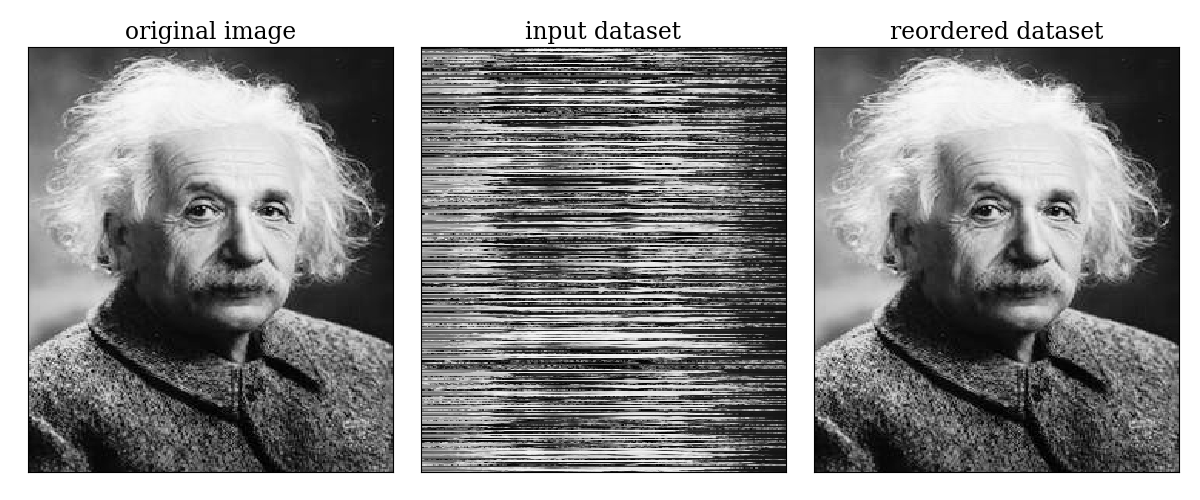
The Sequencer reorders the objects in the input dataset according to a detected sequence, if such sequence exists in the dataset. A good example of a perfect one-dimensional sequence is a natural image: the rows within a natural image form a well-defined sequence. Therefore, we can shuffle the rows in a natural image, and apply the Sequencer to the shuffled dataset. The following figure shows the result of applying the Sequencer to a shuffled natural image. The left panel shows the original image. The middle panel shows the same image after we have shuffled its rows. The shuffled image serves as the input dataset to the Sequencer, where each row is considered as a separate object. The output of the Sequencer is shown in the right panel, where we reordered the rows according to the detected sequence. The Sequencer successfully identified the one-dimensional trend spanned by the different rows.
Command Line Orbit Plotting
OK Binaries Interactive Catalog
https://github.com/mb2448/ok-binaries/
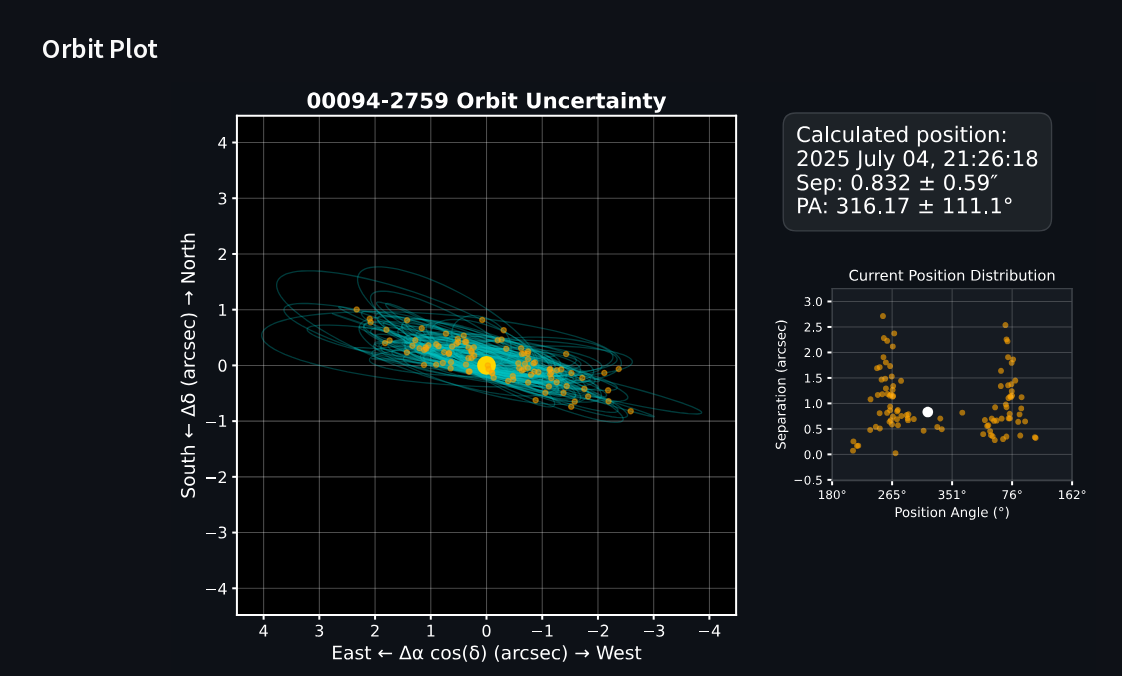
OK Binaries is a tool for identifying suitable calibration binaries from the Washington Double Star (WDS) Sixth Orbit Catalog. It calculates orbital positions at any epoch, propagates uncertainties using Monte Carlo sampling, and generates orbit plots. The web app includes automated daily updates of binary positions and a searchable interface with filters for position, magnitude, separation, and other orbital parameters. OK Binaries can be used online, as a standalone offline browser app, or via the command line.
https://github.com/mb2448/ok-binaries/
https://ok-binaries.streamlit.app/
#space #tech #science #astronomy #code #python #unix #linux #commandline #plotting
Alt...
WDS 00094-2759 - BU 391AB
HIP 761 • HD 493
Orbital Elements
Period (P) 575.65y ± 247.6
Periastron (T) 2087.66 ± 104.9
Semi-major axis (a) 1.614″ ± 0.49
Eccentricity (e) 0.5022 ± 0.31
Inclination (i) 98.72° ± 3.9
Longitude of periastron (ω) 272.7° ± 42.6
Node (Ω) 76.73° ± 6.5
Additional Information
Grade: 4 (1=Definitive, 9=Indeterminate)
Equinox: —
Last observation: 2013
Reference: Izm2019
Notes
kap 1 Scl
CLUES: Clustering tool for analyzing spectral data
CLUES (CLustering UnsupErvised with Sequencer) analyzes spectral and IFU data. This fully interpretable clustering tool uses machine learning to classify and reduce the effective dimensionality of data sets. It combines multiple unsupervised clustering methods with multiscale distance measures using Sequencer (ascl:2105.006) to find representative end-member spectra that can be analyzed with detailed mineralogical modeling and follow-up observations. CLUES has been used on Spitzer IRS data and debris disk science, and can be applied to other high-dimensional spectral data sets, including mineral spectroscopy in general areas of astrophysics and remote sensing.
https://github.com/Ompha/CLUES
https://ui.adsabs.harvard.edu/abs/2021ApJ...916...91B/abstract
https://ui.adsabs.harvard.edu/abs/2025ApJS..276...65L/abstract
#space #tech #science #astronomy #code #python #JupyterNotebook #unix #linux

Alt...
Welcome
Ha! You've stumbled upon this machine-learning classification tools for spectra and IFU data!
Astro Catalog
by Sylvain Villet
https://github.com/sylvainvillet
https://app.astrobin.com/u/SylvainV
https://app.astrobin.com/forum/topic/191541
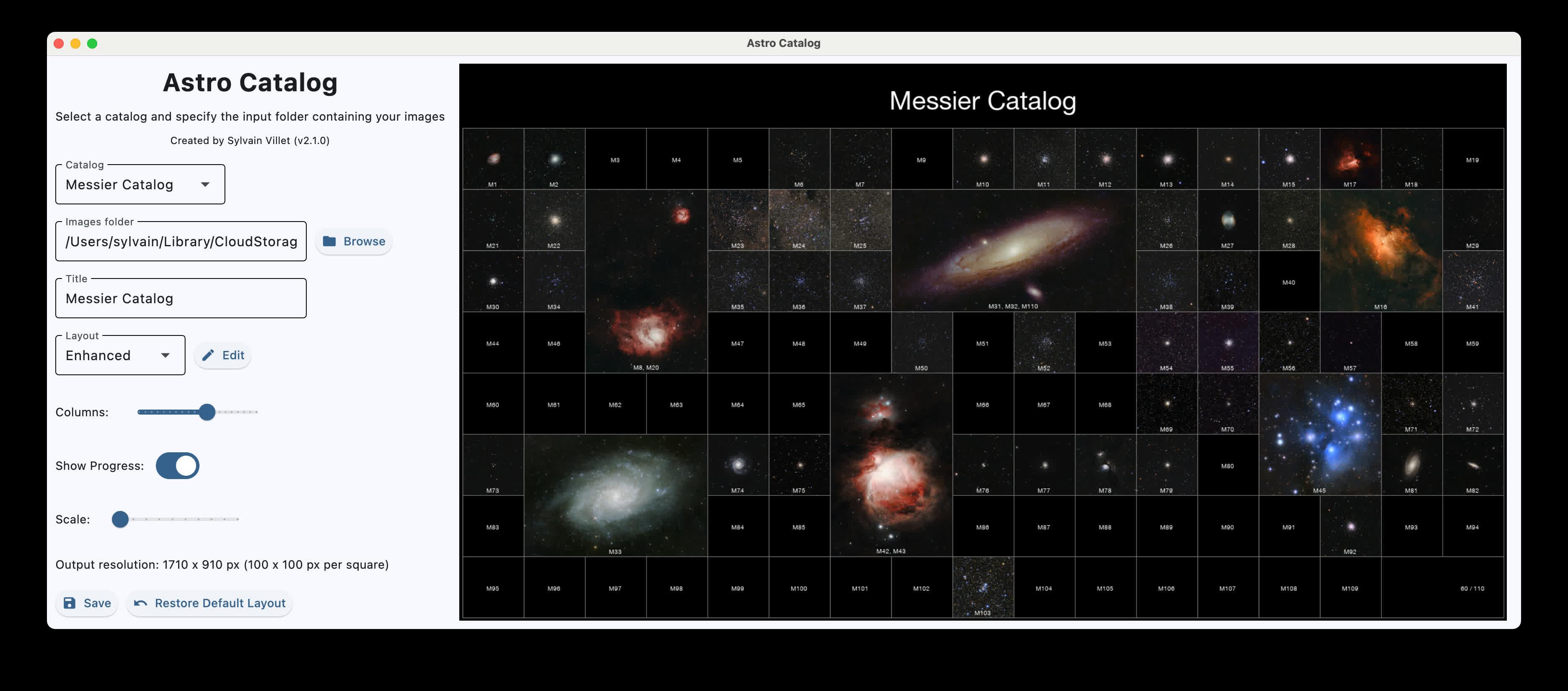
This project generates a mosaic of Messier or Caldwell objects, using images from a local folder.
The script arranges the objects into a configurable grid, supports larger slots for extended targets (e.g. Andromeda), and overlays labels and a title.
Perfect for creating a large-format print.
Features:
+ Loads Messier or Caldwell object images from a folder (M31.jpg, M-31.png, M_31.tif, etc.)
+ Places objects on a grid with configurable layout
+ Supports multi-cell slots for large objects (e.g. M31, M42, M45)
+ Supports grouping multiple objects in one slot for objects close to each other (e.g. M42 and M43, M31 and M32)
+ Adds a title and progress counter if it's not completed yet
+ Draws labels on images and placeholders for missing ones
+ Adjustable size of the final image
+ Saves as JPEG, PNG or TIFF
https://github.com/sylvainvillet/astro-catalog#features
#space #tech #science #astronomy #astrophotography #photography #code #python #unix #linux #commandline #plotting
Alt...
This project generates a mosaic of Messier or Caldwell objects, using images from a local folder.
The script arranges the objects into a configurable grid, supports larger slots for extended targets (e.g. Andromeda), and overlays labels and a title.
Perfect for creating a large-format print.
Features:
+ Loads Messier or Caldwell object images from a folder (M31.jpg, M-31.png, M_31.tif, etc.)
+ Places objects on a grid with configurable layout
+ Supports multi-cell slots for large objects (e.g. M31, M42, M45)
+ Supports grouping multiple objects in one slot for objects close to each other (e.g. M42 and M43, M31 and M32)
+ Adds a title and progress counter if it's not completed yet
+ Draws labels on images and placeholders for missing ones
+ Adjustable size of the final image
+ Saves as JPEG, PNG or TIFF
![[?]](https://pxscdn.com/cache/avatars/789980589548961657/avatar_4v14.jpg)
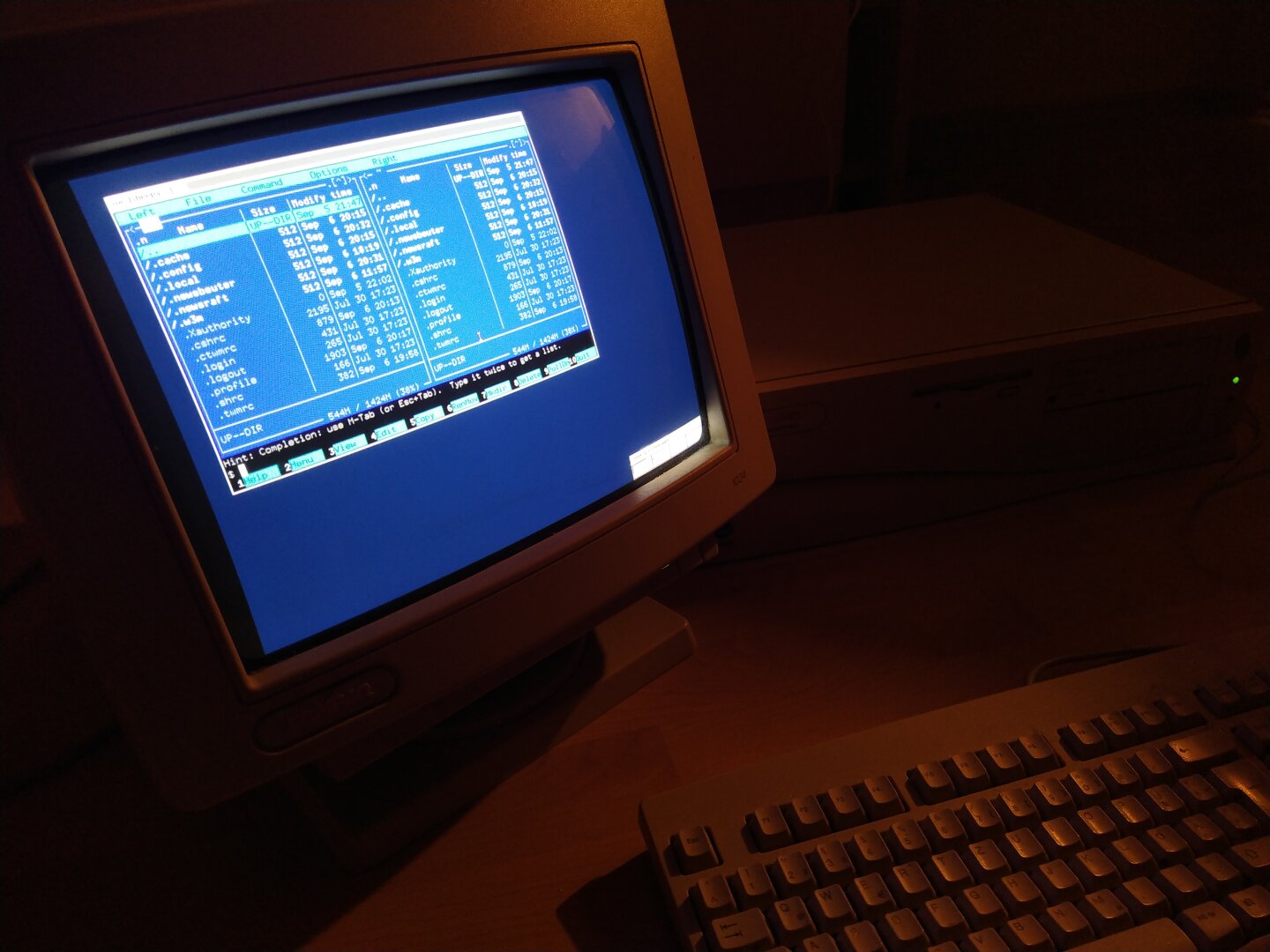
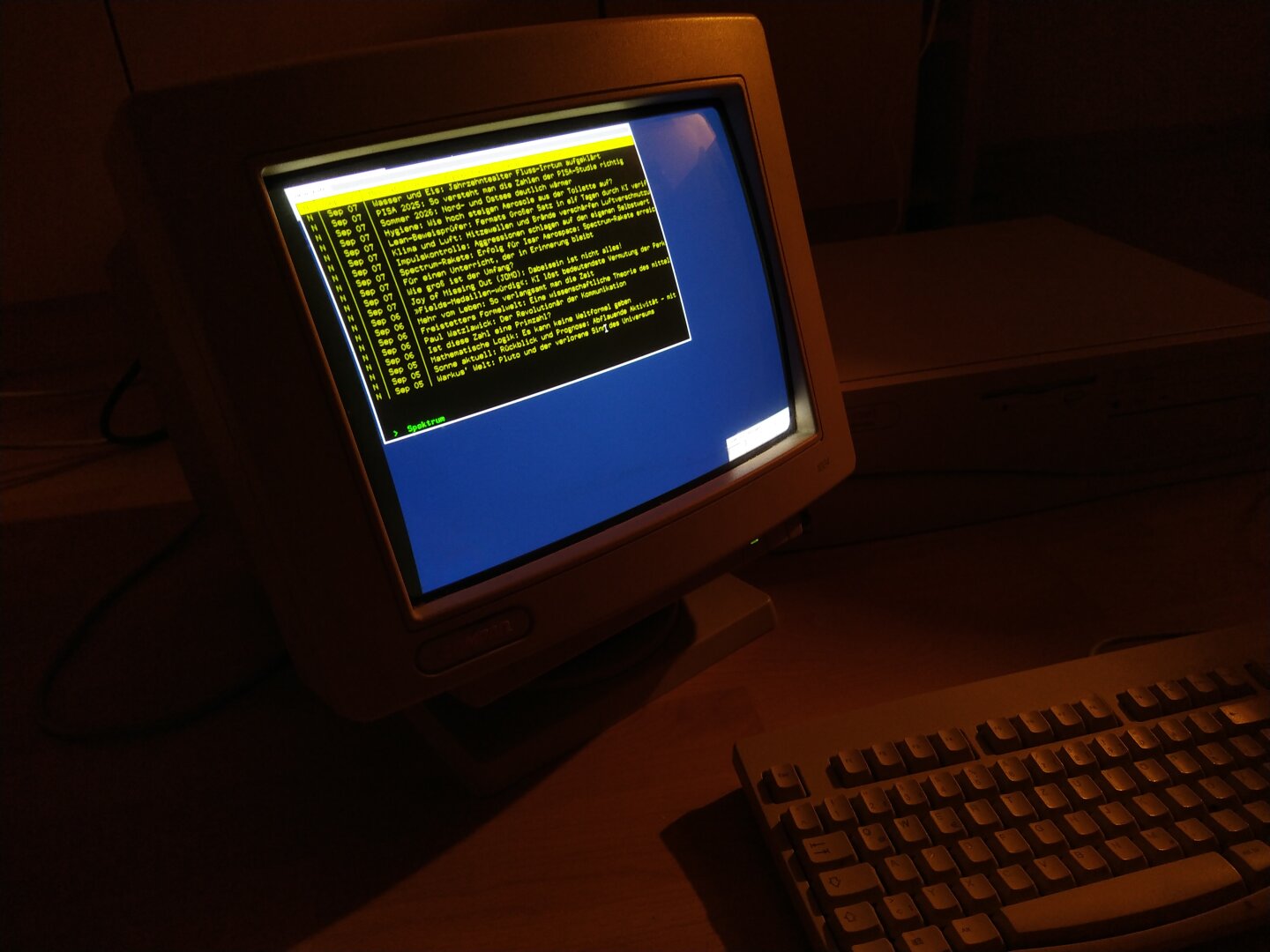
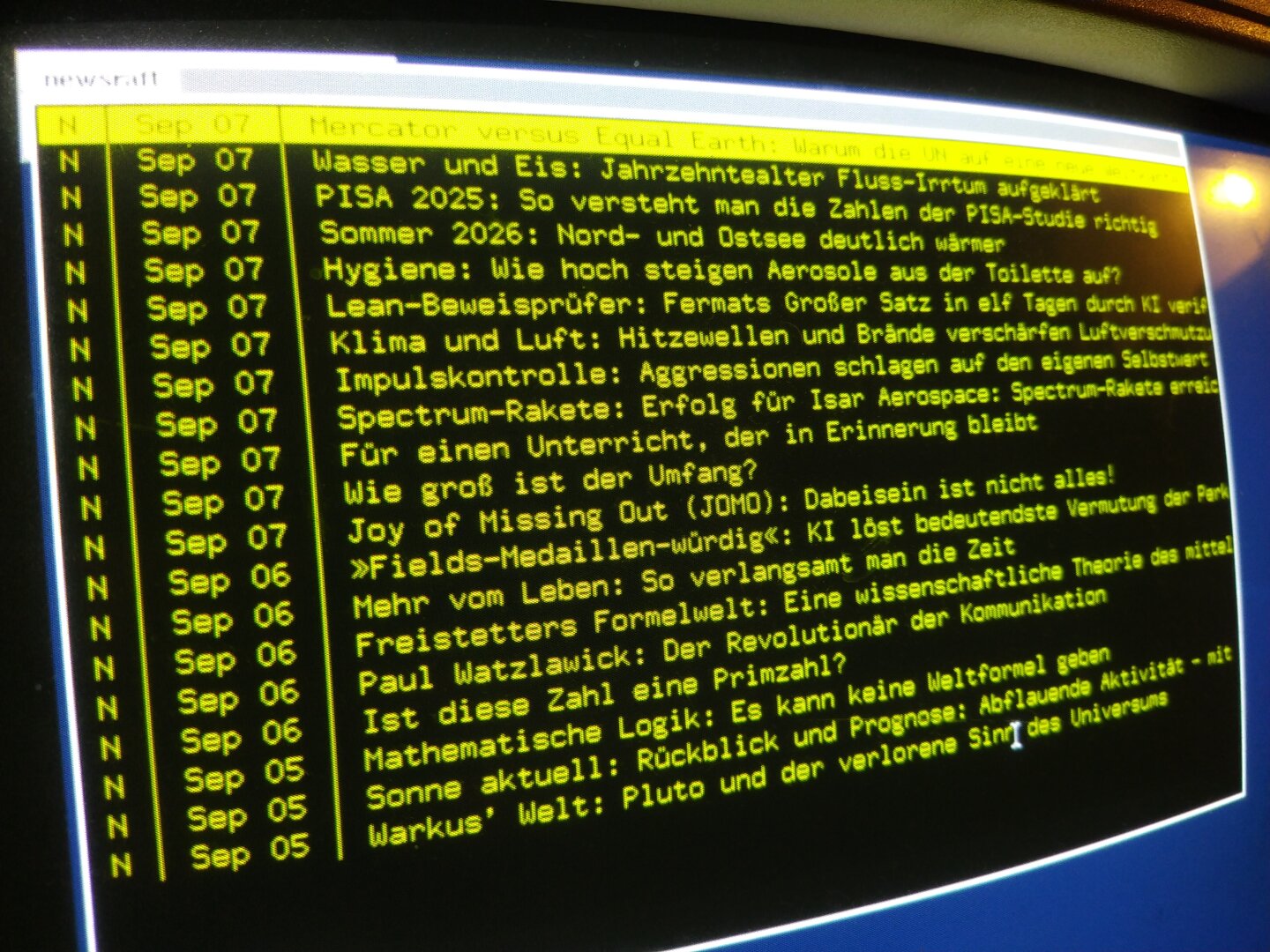
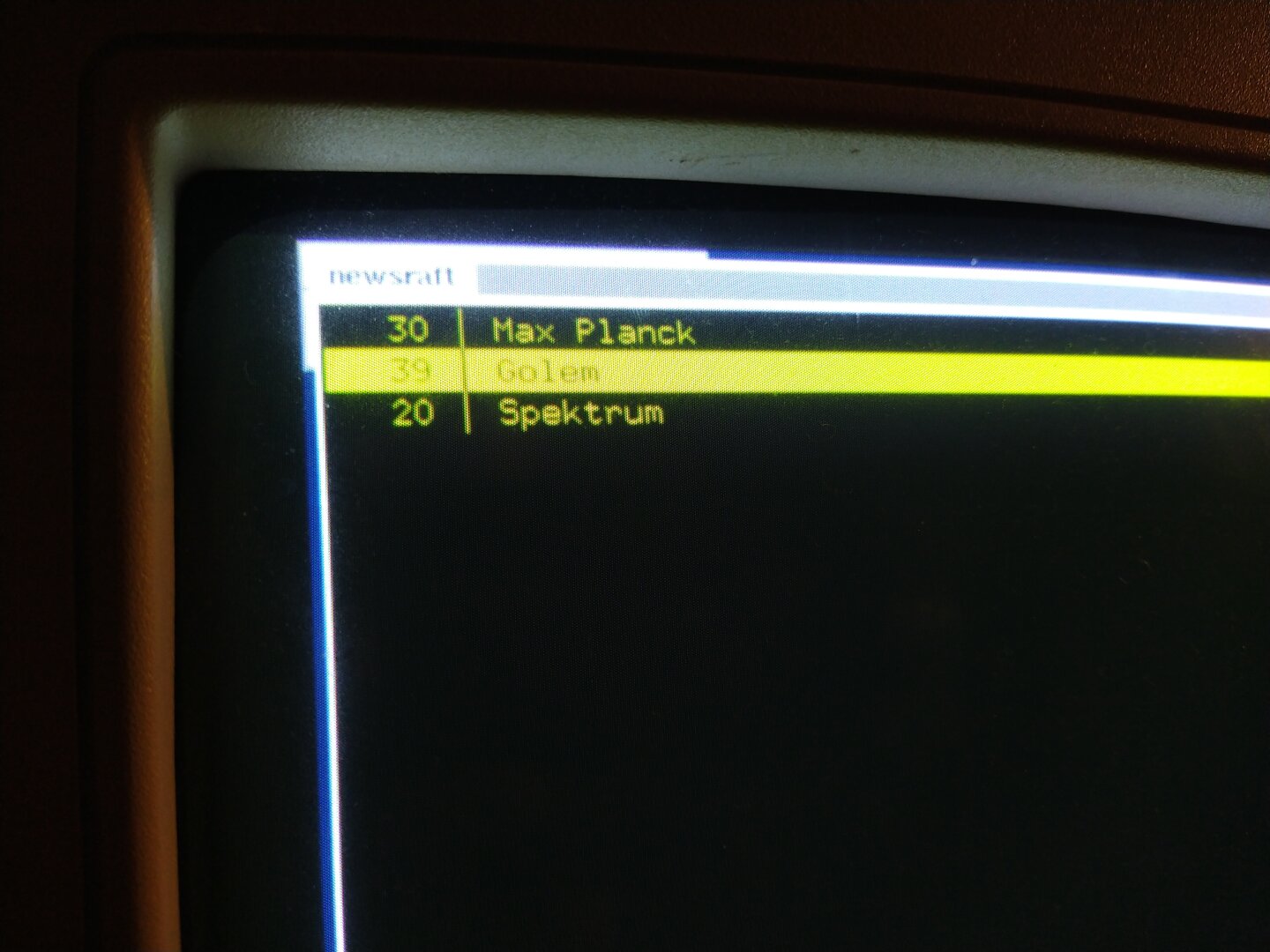
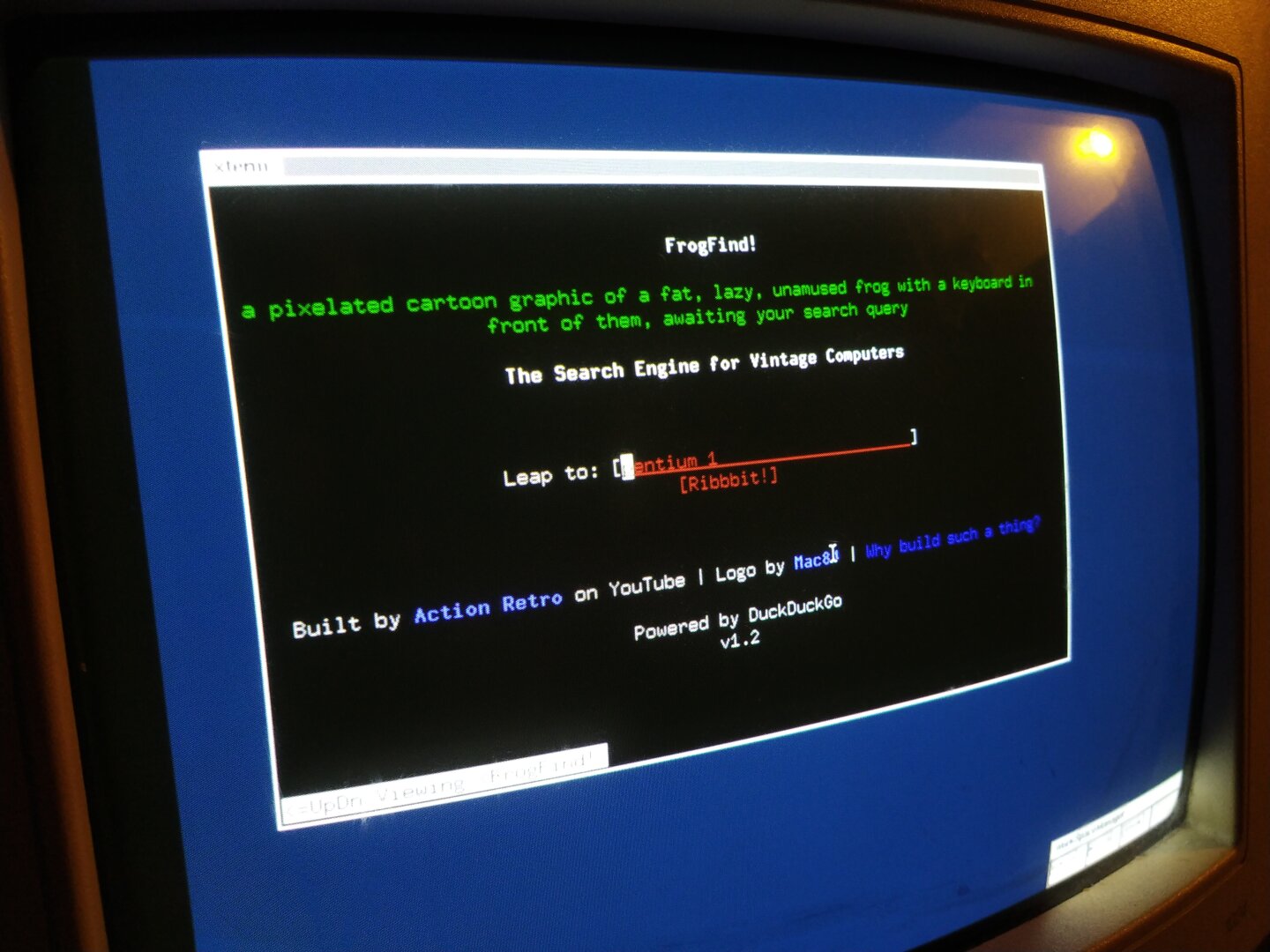
I’ve equipped it with a few useful CLI tools, for example Midnight Commander as a file manager and Newsraft as an RSS reader!
I’ve realized that you could theoretically still be productive on a machine this old (I’m not!!! xD) if you’re willing (NO!) to make a few compromises (OMG NO xD). You can browse the internet (if you don’t care about images, CSS, JS, basically 99.9% of the modern web), write emails, chat, read news feeds, program using GCC, write a PhD thesis in Markdown using vi and then use Pandoc to create the most beautiful PDF in the world xD
Things got interesting with the NetBSD packages: Some of them were built with compiler flags for newer CPU architectures, which means the ABI isn’t compatible with the Pentium 1. For example FLTK, a lightweight GUI library that is used by programs such as Dillo and Newsbeuter.
The prebuilt libfltk.so.2.0.0 doesn’t run on the Pentium 1 because it was built for a newer CPU architecture. So I got the FLTK source and tried to build it myself with appropriate compiler flags.
Then bmake wanted to build a specific GCC version as a dependency and suddenly I was compiling my own GCC from source... which was the point where I gave up!
With pkg_add I also ran into the problem that some packages can’t be installed when they expect different versions of the same dependency, for example different versions of curl.
#RetroComputing #RetroPC #Pentium1 #NetBSD #BSD #i386 #CLI #Terminal #CommandLine #MidnightCommander #Newsraft #FLTK #GCC #OpenSource #FOSS #FreeSoftware #VintageComputing #OldComputers #ComputerHistory #Unix #RetroTechnology #RetroHardware
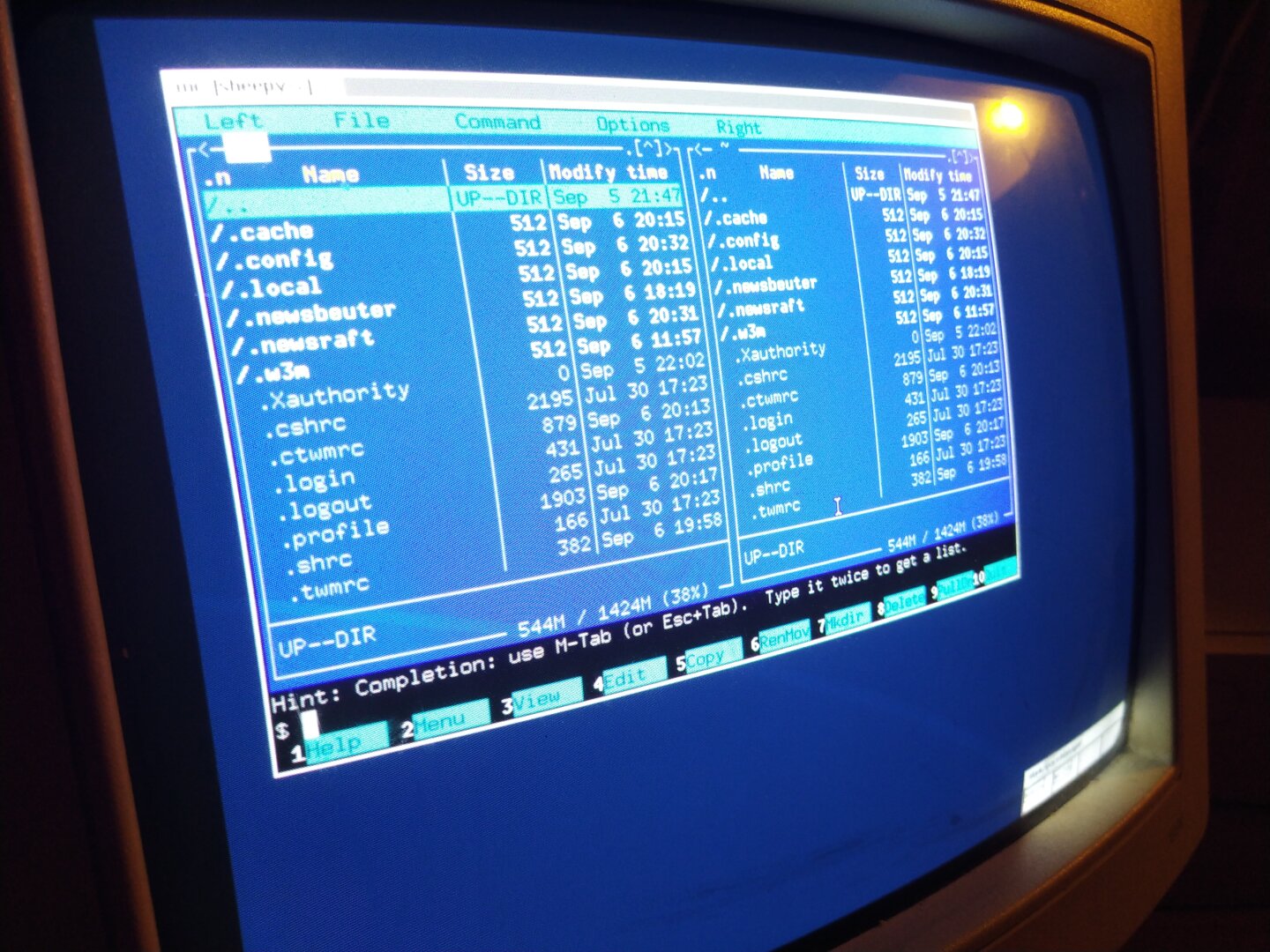
#TIL that ln -s doesn't require a destination. It assumes . if none is given.
rld@prometheus:applications$ ln -s ../../../backups/applications/iamb-flatpak.desktop
rld@prometheus:applications$ ll -rat
total 16,384
-rw-r--r--  2 rld rld   264 Jun  4 17:43 sncli.desktop
-rw-rw-r--  1 rld rld   215 Jun 14 15:33 tut.desktop
lrwxrwxrwx  1 rld rld    46 Jun 14 22:43 tootuser.desktop -> ../../../backups/applications/tootuser.desktop
drwx------ 15 rld rld 4,096 Aug 22 16:44 ..
lrwxrwxrwx  1 rld rld    50 Aug 25 08:00 iamb-flatpak.desktop -> ../../../backups/applications/iamb-flatpak.desktop
drwxrwxr-x  2 rld rld 4,096 Aug 25 08:00 .
rld@prometheus:applications$
DESCRIPTION
       In  the  1st form, create a link to TARGET with the name LINK_NAME.  In the 2nd form, create a link to
       TARGET in the current directory.  In the 3rd and 4th forms, create links to each TARGET in  DIRECTORY.
🤯
(Confirmed it behaves the same on all three major BSDs, as well)
![[?]](https://media.ominous.net/accounts/avatars/115/375/274/384/441/534/original/ebd7c6de7c700c83.png)
Here’s an ad for cross-compilers and assemblers for UNIX environments.
My favorite detail here is this brag: “Over the past 3 years, we’ve built over 1MB of working code.” Cross-compilers, assemblers, simulators, and debuggers targeting six architectures across a dozen hosts. This code was dense.
The 80’s #UNIX wars were a wild time.
It’s also very fun to read the articles from the time and see what they were predicting for the future. “UNIX for the masses” was a popular topic.

Alt...
Vintage advertisement for software development tools, featuring prices for various compilers and utilities.

Alt...
OASYS offers a one-stop shopping service for developers, providing cross-platform, native development tools to save time, energy, and money.
This is an original ad for a #UNIX computer company.
No AI art here! You can see the artist’s signature over the dragon’s wing.

Alt...
A dragon breathing fire over mountains with a rider standing nearby; text highlights Gould's UNIX-based Systems and Firebreather performance.
Editor: quick! I need art to accompany the article on internationalization of #UNIX for our Dec 1985 issue!
Illustrator on shrooms: say no more.

Alt...
A painted illustration of a smooth, glowing bald human head seen from behind, surrounded by a crowd of ornate, expressive ritual masks rendered in earthy tones against a dark background.
Boss: I need art for an article on #UNIX networking technologies for the next issue of UNIX WORLD.
Artist: come back tomorrow.

Alt...
Surreal painting of a blue robotic head with a green eye plugged into the earpiece from an old telephone, held by an armored, futuristic figure against a muted gray background.
Computing in the year 2029 as depicted in UNIX WORLD magazine, 1985.

Alt...
Retro-futuristic scene of a woman with a silver bob haircut in a white outfit firing rainbow laser beams toward three computer monitors, with a wall calendar reading “March 1, 2029.”
![[?]](https://fedi.bobadin.icu/fileserver/01JW8FA8KA9818YWHHBPPZ7TCK/attachment/original/01J0DHDSP9WC6YXEWC97N7TXKR.webp)


I forgot to set up the keybindings for the external monitor.
Now I can mess around with two monitors even on NetBSD 🤣
If anyone is interested (replace --output parameter if necessary)
# xrandr keybindings for external monitor
bindsym $mod+Ctrl+s exec --no-startup-id xrandr --output DP2 --primary --mode 1920x1080 --left-of eDP1
bindsym $mod+Ctrl+d exec --no-startup-id xrandr --output DP2 --primary --mode 1920x1080 --right-of eDP1
bindsym $mod+Shift+s exec --no-startup-id xrandr --output HDMI2 --primary --mode 1920x1080 --left-of eDP1
bindsym $mod+Shift+d exec --no-startup-id xrandr --output HDMI2 --primary --mode 1920x1080 --right-of eDP1
bindsym $mod+Ctrl+o exec --no-startup-id xrandr --output DP2 --off
bindsym $mod+Shift+o exec --no-startup-id xrandr --output HDMI2 --off
P.S. Thanks, xrandr!
#bsd #netbsd #bsdunix #unix #unixITA #unixitalia #guuf #guufxmpp #guufITA #linux #linuxITA #linuxitalia

Alt...
A laptop and a monitor on a wodden table
![[?]](https://cdn.discuss.systems/accounts/avatars/115/918/347/060/720/003/original/caf1f9d7ce449c5a.jpg)
I got telnet working with UNIX V4, multiplexed with my physical terminals so more Low Resource Computing attendees can play with it at once!
#unix #vintagecomputing #retrocomputing
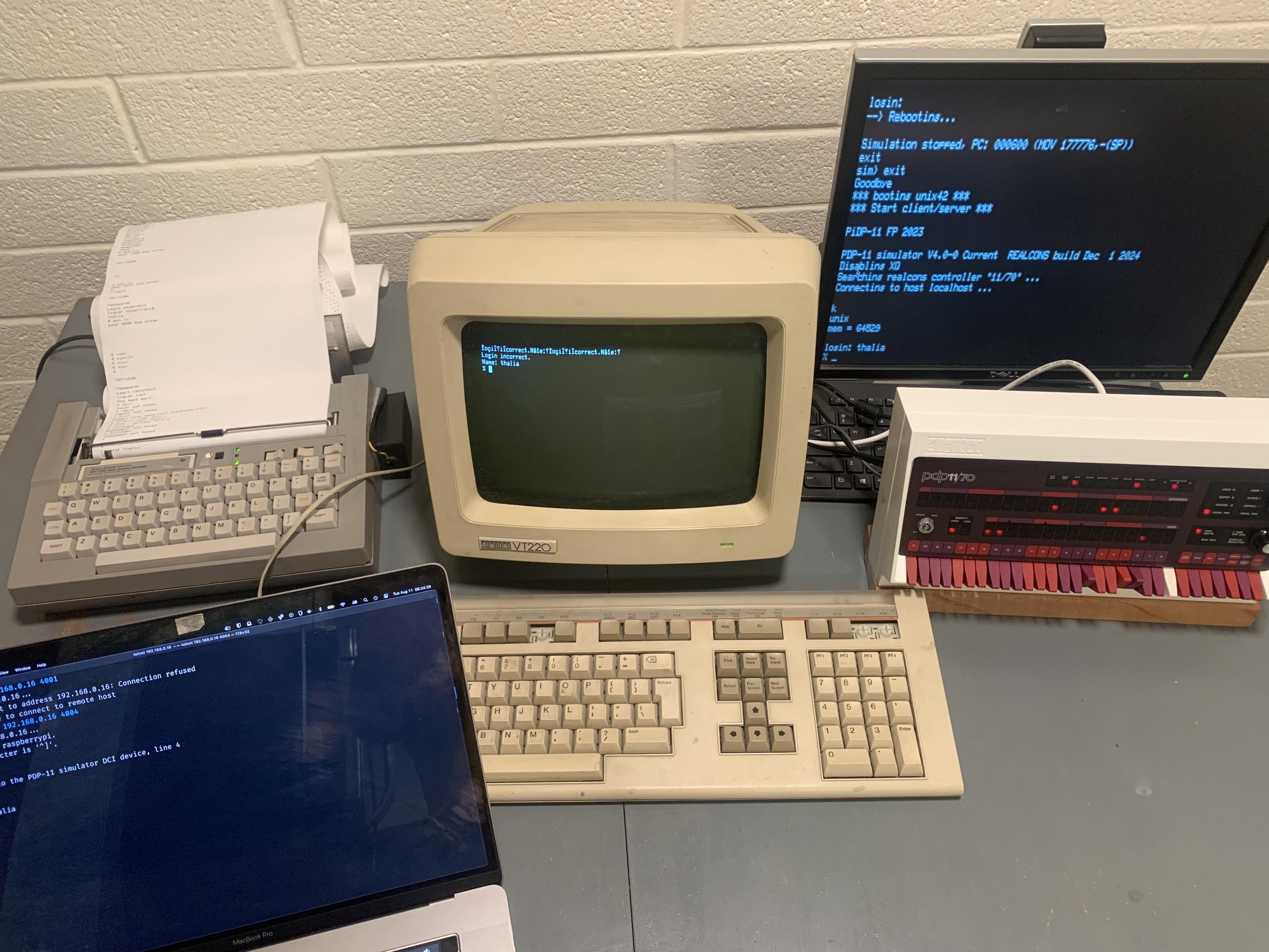
Alt...
A PiDP-11 running UNIX V4, with an emulated VT52 serving as the main console, a Silent 707/1200 and VT220 connected over RS-232, and a MacBook connected over telnet.
Unfortunately, for of my university mail account, I have to use Microsoft Outlook (I know, I know! Luckily, I’ve set up a redirect, so I hardly ever have to use it).
Tonight I tried using Firefox on NetBSD, but “Something went wrong.”
When I changed the user agent and set it to "Firefox on Linux", everything works fine, no problems, nothing "was wrong"!
In short, I think “Microsoft loves open source" but not NetBSD 😆.
One more reason to keep using it 😈
(Forgive the corny joke, I know MS doesn’t actually love open source at all 😆)
#bsd #netbsd #bsdunix #unix #unixITA #unixitalia #guuf #guufxmpp #guufITA #linux #linuxITA #linuxitalia
![[?]](https://fe.upload.disroot.org/media/3d5168bf7c180fe664778a32ba9dd100db356e5031836f0414b1ca746689d636.jpg)
Mission accomplished, it seems!
I must have messed something up during "sysupgrade etcupdate" because my user was no longer in the "wheel" group, but luckily it wasn't a big deal (thanks usermod 🤣)
Then I updated pkgsrc with "cvs update -dP" and edited /usr/pkg/etc/pkgin/repositories.conf to change the release number.
I hope that’s correct!
The update of all packages was successful, so I’m assuming it is.
Is it normal that "pkgin upgrade" re-download and reinstall all packages, even those that are already the same version?
I'd say the overall experience has been very positive.
P.S. i3status gives me an error if I use UTF-8 "icons" (it worked with 10.1), but it's not really a big deal.
#bsd #netbsd #bsdunix #unix #unixITA #unixitalia #guuf #guufxmpp #guufITA #linux #linuxITA #linuxitalia

Alt...
my NetBSD desktop with a terminal emulator (alacritty) and macchina output result.
![[?]](https://files.mastodon.online/accounts/avatars/108/202/496/480/191/197/original/e1f90be72ccbe499.jpg)
When building, bugfixing, or porting a new compiler (yes, back when dinosaurs ruled the earth, it was something I did back in the 90s for my first job out of college) it was standard operating procedure to build it 3 times.
First with the existing compiler. Then the output of that first step was used to compile its own source. Finally, that output did it one more time. Those last two artifacts should be bitwise identical. If not, you had a bug somewhere.
![[?]](https://files.mastodon.social/accounts/avatars/000/038/659/original/b0de8058da52f2aa.jpg)
The key to knowing if a FreeBSD box reboot is needed lies in comparing the installed kernel version with the currently running kernel version. How do you do that?
1 Get the version of the running kernel:
`freebsd-version -r`
2 Get installed FreeBSD kernel version:
`freebsd-version -k`
3 Since 14.4-RELEASE-p7 & 14.4-RELEASE-p8 are different versions, reboot it
`sudo reboot`
More here if you want to do this in automated way with ansible https://www.cyberciti.biz/faq/freebsd-determine-if-a-system-reboot-is-necessary/
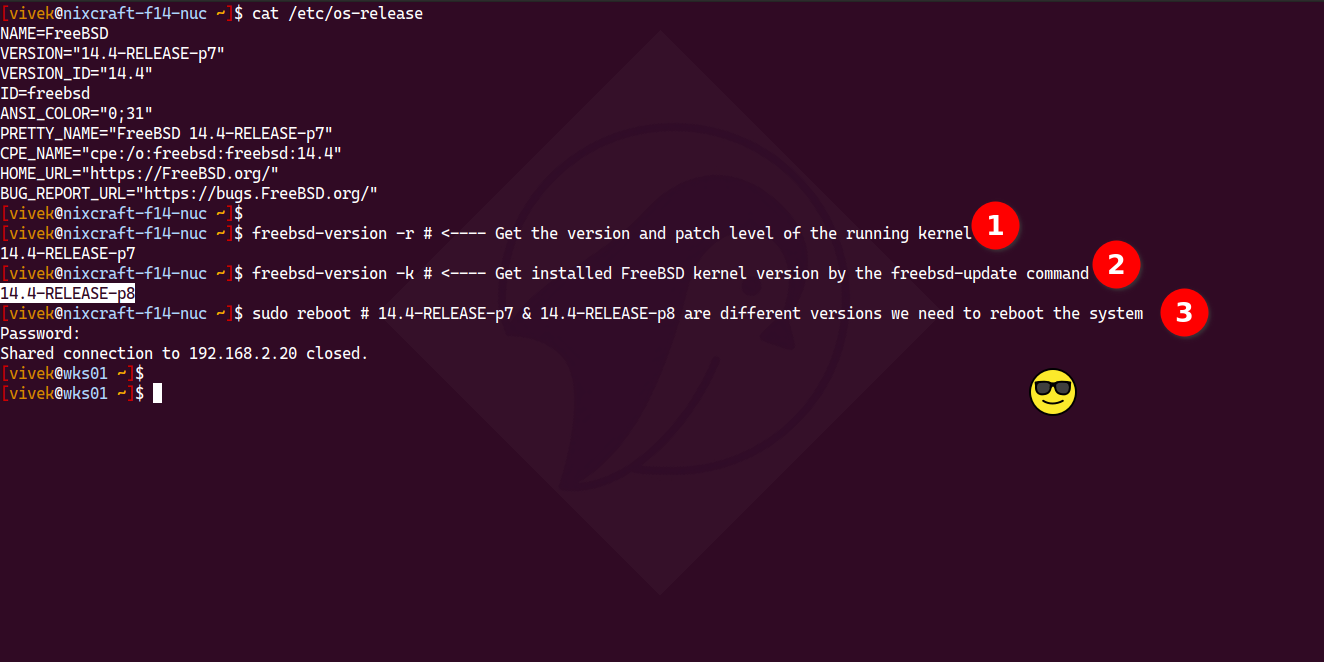
Alt...
The terminal screenshot showing FreeBSD commands to check kernel versions and reboot the system by running:
freebsd-version -r # <---- Get the version and patch level of the running kernel
freebsd-version -k # <---- Get installed FreeBSD kernel version by the freebsd-update command
sudo reboot # 14.4-RELEASE-p7 & 14.4-RELEASE-p8 are different versions we need to reboot the system
This is the umpteenth time I've tried this, starting with version 1.6.1 😅
Could this be the definitive? I hope 💪
Now I have to config automount for external disk/USB keys and I need to find a way to encrypt my external disk and use it both in GNU\Linux and NetBSD.
CGD (I never tried it on Linux and I didn't find anything online)?
ZFS? Anyone have an idea?
I know I can use OpenSSL or GPG but I think it's better and more confortable to encrypt the full drive...
P.S. I love NetBSD but pkgin is really slow 😅 (It's probably not a problem with pkgin, but rather my Wi-Fi card.)
#bsd #netbsd #bsdunix #unix #unixITA #unixitalia #guuf #guufxmpp #guufITA #linux #linuxITA #linuxitalia

Alt...
My new NetBSD with i3wm, Alacritty terminal emulator with "macchina" output (top-right) and Alacritty with text "Hello Fedifriends" (Ascii art, figlet output, bottom left).
The wallpaper is a black and white rappresentation of a scene from the book/movie Iron Giant.
NetBSD 11.0 RC7 available!
July 23, 2026 posted by Martin Husemann
The NetBSD project is pleased to announce the seventh release candidate of the upcoming 11.0 release, please help testing!
See the release announcement for details.
The netbsd-11 release branch is nearly a year old now, so it is high time the 11.0 release makes it to the front stage.
https://blog.netbsd.org/tnf/entry/netbsd_11_0_rc7_available
#bsd #netbsd #unix # runbsd #guufxmpp #guuf #guufITA @guuf_italia @livellosegreto.it
```
find / -name "*FOO*txt" -ls
# match is case insensitive
find / -iname "*FOO*txt" -ls
```
will search '/', and all subdirectories, for files with 'FOO' and ending with 'txt' in the name. You don't need AI Terminal Wrapper or AI agents for this on your desktop. Stop sending data to big tech.
![[?]](https://media.beige.party/accounts/avatars/116/269/577/114/010/627/original/f908dbc2306d0e37.gif)
![[?]](https://cdn.masto.host/indiewebsocial/accounts/avatars/112/536/017/792/352/435/original/a87e9128d6303e02.png)
You are not expected to understand this https://en.wikipedia.org/wiki/A_Commentary_on_the_UNIX_Operating_System
#unix #history #linux #opensource
![A screenshot from Wikpedia.
Title: You are not expected to understand this
Text read:
The infamous program comment "You are not expected to understand this" occurs on line 2238 of the source code (Lions' Commentary, p. 22) at the end of a comment explaining the process exchange mechanism. It refers to line 325 of the file slp.c.[9] The source code reads:[10][11]
The source code:
/*
* If the new process paused because it was
* swapped out, set the stack level to the last call
* to savu(u_ssav). This means that the return
* which is executed immediately after the call to aretu
* actually returns from the last routine which did
* the savu.
*
* You are not expected to understand this.
*/
if(rp->p_flag&SSWAP) {
rp->p_flag =& ~SSWAP;
aretu(u.u_ssav);
}
Taken from https://en.wikipedia.org/wiki/A_Commentary_on_the_UNIX_Operating_System](https://files.mastodon.social/media_attachments/files/116/852/007/361/299/577/original/204d316bff397285.png "A screenshot from Wikpedia.
Title: You are not expected to understand this
Text read:
The infamous program comment \"You are not expected to understand this\" occurs on line 2238 of the source code (Lions' Commentary, p. 22) at the end of a comment explaining the process exchange mechanism. It refers to line 325 of the file slp.c.[9] The source code reads:[10][11]
The source code:
/*
* If the new process paused because it was
* swapped out, set the stack level to the last call
* to savu(u_ssav). This means that the return
* which is executed immediately after the call to aretu
* actually returns from the last routine which did
* the savu.
*
* You are not expected to understand this.
*/
if(rp->p_flag&SSWAP) {
rp->p_flag =& ~SSWAP;
aretu(u.u_ssav);
}
Taken from https://en.wikipedia.org/wiki/A_Commentary_on_the_UNIX_Operating_System")
Alt...
A screenshot from Wikpedia.
Title: You are not expected to understand this
Text read:
The infamous program comment "You are not expected to understand this" occurs on line 2238 of the source code (Lions' Commentary, p. 22) at the end of a comment explaining the process exchange mechanism. It refers to line 325 of the file slp.c.[9] The source code reads:[10][11]
The source code:
/*
* If the new process paused because it was
* swapped out, set the stack level to the last call
* to savu(u_ssav). This means that the return
* which is executed immediately after the call to aretu
* actually returns from the last routine which did
* the savu.
*
* You are not expected to understand this.
*/
if(rp->p_flag&SSWAP) {
rp->p_flag =& ~SSWAP;
aretu(u.u_ssav);
}
Taken from https://en.wikipedia.org/wiki/A_Commentary_on_the_UNIX_Operating_System
![[?]](https://gts.tumfatig.net/fileserver/01FJ093H6Y5VGN20G998J7KN1M/attachment/original/01JZTJV1P9RVJ502PCXKN68R1F.jpeg)

![[?]](https://media.bsd.cafe/bsdmmedia01/accounts/avatars/110/897/841/857/820/580/original/440da7fe4ff168a8.webp)
So I wanted to share with you this little project of mine. I delved into "retro-necromancy" and reanimated one very old UNIX utility called ile written by Robert Pendleton in 1988. I found it on one of the Walnut Creek source code CDs from 1994.
What it does is simply works like an input line editor (hence ile) for shells and programs that do not support interactive line editing. To put it simply, it adds Emacs-style keybindings like ^A, ^E, ^K, ^U and so on and command history that you can easily navigate.
Of course, these days it's hard to find a shell that doesn't support line editing.
But this little tool can still be usable, for example, with ed. It's nice to have Emacs-style editing in ed.
It can work like shell replacement or just run like a "middleman" between any given program. It respects terminal settings and doesn't get in a way. Keybindings are configurable.
Needless to say, the code from 1988 wouldn't run on any modern system. It was written in K&R style because there was no ANSI C standard yet! And #UNIX was quite a different beast back then.
So I ported it to modern systems, rewrote outdated bits (like sgttyb ioctls and brutal utmp handling).
Currently it builds and runs on #Linux, #OpenBSD, #FreeBSD and #NetBSD. Hopefully without too much bugs.
You can find it on Codeberg:
https://codeberg.org/chesheer/ile
#Unix / #sed / #awk / #shell ninjas,
What's the easiest way to suppress anything more than 2-3 blank lines at a time? I don't want to remove all blank lines, just excessive blank lines.
I'm coming up with a simple shell function to strip html tags, because I don't like the way terminal browsers re-flow/wrap the text when you use the -dump|--dump option.
The way I'd normally do it is something like:
sed 's/$/{lineend}/' |tr -d '\n' |sed -E 's/(\{lineend\}){3,}/\1\1\1/g; s/\{lineend\}/\n/g'
…but I figure there's probably a more elegant way?
![[?]](https://stockage.framapiaf.org/framapiaf/accounts/avatars/000/089/837/original/01abbbdd418dd20c.png)
𝗧𝗲𝘀𝘁 𝘆𝗼𝘂𝗿 𝘀𝘆𝘀𝗮𝗱𝗺𝗶𝗻 𝘀𝗸𝗶𝗹𝗹𝘀:
https://thewhale.cc/posts/test-your-sysadmin-skills
This project contains examples of test questions and answers that can be used during an interview or exam for positions such as *nix System Administrator.
Alt...
This project contains examples of test questions and answers that can be used during an interview or exam for positions such as *nix System Administrator.
Think I've got enough #ksh implementations installed? XD
rld@Intrepid:~$ pkg info |grep ksh
ksh-1.0.10                     ksh93u+m is the renewed development of ksh93 based on AT&T ksh93u+m (stable)
mksh-59c_3                     MirBSD Korn Shell
oksh-7.8,1                     Portable OpenBSD Korn shell
pdksh-5.2.14p2_7               The Public Domain Korn Shell
rld@Intrepid:~$
#mksh #pdksh #oksh #testing #unix #unixShell #ShellScripting
The Optimist: The universe is expanding and the glass is half full!!!
The Pessimist: The universe is heading toward maximum entropy and the glass is half empty.
The #Linux / #Unix Sysadmin: > /dev/null 2>&1
The glass does not exist, the universe is a simulation and have successfully muted all alerts about it.
![[?]](https://gamerplus.org/system/accounts/avatars/114/497/966/782/841/054/original/c3c1b4d840d49021.png)
![[?]](https://media.mathstodon.xyz/accounts/avatars/109/308/315/960/319/189/original/8bcb7021908599d9.jpeg)
#UNIX is not just an OS; it is the ultimate #IDE for #programmers. Arguably the best written introductory book on UNIX programming is "The UNIX Programming Environment", Kernighan (1983). This book covers UNIX V7, but I used it with 4.2BSD.
There is another jewel of a book of a similar kind, a free one to boot, by Prof. Ballesteros (King Juan Carlos University): "Introduction to Operating Systems Abstractions Using Plan 9 from Bell Labs" (2007). Prof. Ballesteros wrote this book to teach his CS students the fundamentals of good OS design.
Although almost no one uses #Plan9 today, it is alive and kicking. It even runs on Raspberry Pi. Anyone interested in OSs and likes the philosophical underpinnings of UNIX should take a look at Plan 9.
The other must-read book is his "Notes on the Plan 9 3ed Kernel Source" (2007).
Prof. Ballesteros has many Plan 9 related publications in PDF format.
https://lsub.org/books-papers/
PS—Those with a historical bent should also read Organick's "The Multics System: An Examination of Its Structure" (1980). Multix is the mother of UNIX, and Plan 9 is the grown-up UNIX.
haha. Joke asides, there are few ways to ignore bash aliases. For example, to ignore python alias, type the `command` followed by alias name:
```
command python ...
```
Both \ and " symbols allows you to run real python command and ignore python alias at the CLI:
```
\python ...
"python" ...
```
Or just full path:
```
/usr/bin/python ...
```
more @ https://www.cyberciti.biz/faq/ignore-shell-aliases-functions-when-running-command/ in case if you wish to read.
#unix #linux #opensource

Alt...
This is meme about Linux or Unix CLI especially alias feature offered by bash. An inmate in prison asks a small fellow inmate, "What you in for?" The small inmate replies that they added 'alias python=echo "bash: python: command not found"' to a friend's .bashrc file. The large inmate backs away in terror, yelling, "Dude, WTF?!"
Following on from a recent conversation with @rl_dane about running Joy+Horton #vi in one of its three (sic!) 'open' modes on a paper terminal:
I decided to see whether any modern #termcap or #terminfo database actually had any settings anywhere for switching dot matrix printers between near-letter, draft, and letter quality modes.
#Illumos, #OpenBSD, #Debian, and #NetBSD all use the Dickey terminfo.src. #FreeBSD is the only one maintaining a different database. It is still maintaining the old BSD termcap file, in 2026.
Neither of the databases have sdrfq/snlq/snrmq or ZG/ZL/ZK capabilities in any record.
This stuff exists solely as words on a manual page (and reprints of the same in various books) and a single Usenet post by Oliver Okrongli in 1994. It's not even in the O'Reilly termcap+terminfo book.
We should prune such stuff that apparently has never really existed.
In the #shell #functions I should have written years ago category...
function fedilinktousername {
    grep -oE 'https?://[^/]+/@[^/ ]+' |sed -E 's|https?://|@|; s|/@|@|; s/(@[^@]*)(@[^@]*)/\2\1/'
}

function fediusernametolink {
    grep -oE '(@[^@ ]+){2}' |sed -E 's|(@[^@ ]+)@([^@ ]+)|https://\2/\1|'
}
rld@Intrepid:~$ clipo
https://polymaths.social/@rl_dane/statuses/01KVJCAG6Y4C1KTGBDBECH2778
rld@Intrepid:~$ clipo |fedilinktousername
@rl_dane@polymaths.social
rld@Intrepid:~$ clipo |fedilinktousername |fediusernametolink
https://polymaths.social/@rl_dane
rld@Intrepid:~$
![[?]](https://media.bsd.cafe/bsdmmedia01/accounts/avatars/113/669/805/004/044/990/original/1d8537dc414c57ea.png)
Important question time! This one is for my shell using #UNIX/#Linux friends.
We already know bash is going to win. The second place position is the most interesting one here!
Oh, and this is a VERY loaded poll.
| bash - I'm a basic bitch: | 52 |
| fish - I'm a basic bitch with flair: | 13 |
| zsh - I'm so edgy: | 52 |
| ksh/pdksh - I'm edgy, and in a hurry: | 9 |
| sh - I am old, get off my lawn: | 13 |
| dash - I script like I'm old: | 2 |
| csh - I am an out of date FreeBSD installation: | 2 |
| tcsh - I am very angry: | 2 |
| Powershell - My puter has pwetty icon thingies!: | 5 |
👿 FreeBSD 15.1 Released With Updated WiFi Drivers, Better C23 Support & Other Improvements https://www.phoronix.com/news/FreeBSD-15.1-Released
Seriously, why didn't I put this in my ~/.bashrc like... YEARS ago? 😆
year=$( date +%Y)
month=$(date +%m)
day=$(  date +%d)
 boosted
![[?]](https://social.highenergymagic.net/system/accounts/avatars/116/201/069/828/972/775/original/7dab817c9888e681.jpg) Ra (Freyja) (it/its)𒀭𒈹𒍠𒊩 (cringe EU-brained military girl) [we/us; q=1.2; use_third_person=true; details_link=<none>, it/its; q=1.0, she/her; q=0.9; they/them; q=0.1, */*; q=0.0] » 🌐
Ra (Freyja) (it/its)𒀭𒈹𒍠𒊩 (cringe EU-brained military girl) [we/us; q=1.2; use_third_person=true; details_link=<none>, it/its; q=1.0, she/her; q=0.9; they/them; q=0.1, */*; q=0.0] » 🌐
@freya@social.highenergymagic.net
hey so. looking for a job (NZ or fully remote willing to hire a kiwi) in SRE, security, or linux/Unix system administration. 15 years experience administering Linux and Unix boxes, intermediate level of experience working with docker compose and containerisation and container security. No prior job experience unfortunately, all those 15 years were mostly personal projects and small-scale stuff for friends. I'm also 26, so I started when I was 11, explaining the no jobs so far. Currently running an entire multi-machine personal cloud infrastructure with a demonstration of all the services I have running at https://status.highenergymagic.net. Three machines, 72 docker containers. One running most of them, one running Mastodon+glitchsocial, one running the uptime monitor. encrypted root on ZFS, alpine linux, gVisor on supported containers, plan to move to Kata. Entirely willing to accept entry-level job placements, no expectation of being paid a lot or anything, just want to be doing something and move the needle a little on my current "being broke" status. Currently using gVisor, docker compose, and kata containers in production, experience with Linux, docker, Net/Open/FreeBSD, Cisco IOS, Juniper Junos, Mikrotik and UniFi, configuring and administering Asterisk, plus extensive experience with IBM AIX and Sun Solaris. #fedihired #infosec #cybersecurity #linux #unix #docker #sre #DevOps #GetFediHired
Please boost for reach, any job offers please DM me.
Ra (Freyja) (it/its)𒀭𒈹𒍠𒊩 (cringe EU-brained military girl) [we/us; q=1.2; use_third_person=true; details_link=<none>, it/its; q=1.0, she/her; q=0.9; they/them; q=0.1, */*; q=0.0] » 🌐
@freya@social.highenergymagic.net
hey so. looking for a job (NZ or fully remote willing to hire a kiwi) in SRE, security, or linux/Unix system administration. 15 years experience administering Linux and Unix boxes, intermediate level of experience working with docker compose and containerisation and container security. No prior job experience unfortunately, all those 15 years were mostly personal projects and small-scale stuff for friends. I'm also 26, so I started when I was 11, explaining the no jobs so far. Currently running an entire multi-machine personal cloud infrastructure with a demonstration of all the services I have running at https://status.highenergymagic.net. Three machines, 72 docker containers. One running most of them, one running Mastodon+glitchsocial, one running the uptime monitor. encrypted root on ZFS, alpine linux, gVisor on supported containers, plan to move to Kata. Entirely willing to accept entry-level job placements, no expectation of being paid a lot or anything, just want to be doing something and move the needle a little on my current "being broke" status. Currently using gVisor, docker compose, and kata containers in production, experience with Linux, docker, Net/Open/FreeBSD, Cisco IOS, Juniper Junos, Mikrotik and UniFi, configuring and administering Asterisk, plus extensive experience with IBM AIX and Sun Solaris. #fedihired #infosec #cybersecurity #linux #unix #docker #sre #DevOps #GetFediHired
Please boost for reach, any job offers please DM me.
These are some of the great textbooks to teach #UNIX #OS to #CS undies:
• V6, Lions
• SVR2, Bach
• MINIX3, Tanenbaum
• Xinu, Comer
• xv6 (V6 clone), Cox
But there is a space to create an even smaller, sleeker, simpler, study OS:
• Barebones 32-bit OS that runs on a cheap Cortex-M3 board (STM32 Blue Pill) or RISC-V board (ESP32-C6)
• Keep the code under 10k lines of C (or Ada, Rust, Zig, ...)
• Support only UNIX-like soft-realtime scheduling (no RTOS)
• Support user and kernel modes
• Multiplex the single-core CPU to multiple processes
• Map a handful of interrupts to signals
• Provide a subset of the POSIX API, just enough to run a simple I/O executable (button pushy/LED blinky) in multiple processes, simultaneously
• Single-user (root only) operation
• No security, accounting, etc.
• Shell on a terminal emulator, via a USB-TTL adapter
The goal is to create a smallest, simplest, bona fide OS for the cheapest ($0.99) hardware, so as to steer kids away from Scratch, MicroPython, Processing, and similar other harmful influences, during the early phase of their system #programming education.
To make explicit the implicit premise above, the marvellous Arduino teaches the kids to do the easy thing repeatedly, but a comparative-joke C64 forces the kids to do the right thing persistently.
It is infeasible to teach, in detail, the essentials of an OS (scheduling algorithms, process management, memory management, memory protection, authentication, authorisation, encryption, disc I/O, network I/O, graphics I/O, ...) in just one semester.
In contrast, the kids could master the above mentioned focused curriculum in just one semester, thereby gaining much confidence in system #programming.
![[?]](https://cdn.fosstodon.org/accounts/avatars/000/297/547/original/c0873a21fdbacc62.jpg)
Change Default Linux/Unix Image Viewer Application
Use this complete guide to change the default image viewer application for a graphical desktop environment on a GNU/Linux or Unix operating system.
https://www.adamsdesk.com/posts/change-default-linux-unix-image-viewer/
#blog #KDE #XFCE #GNOME #linux #unix #tech
Alt...
Rays of light scatter down and outward through the blue and purplish water in the background. The foreground is made up of a group of three polaroids spread out like playing cards each with their own image viewer logo in the centre along with a strong title of 'Set Your Default Linux/Unix Image Viewer'.
Please don’t be shocked, but I’ve been reading old #UNIX Review magazines on Archive.org, as one does. I’ve been finding a number of interesting artifacts throughout. This June 1984 ad by Cadmus Computer Systems listed a #USENET address: !wivax!cadmus.
This is a UUCP bang path, for the kids who don’t know. The ! separates relay hops, it’s a literal routing instruction. Get to the backbone, reach wivax, forward to cadmus.
No DNS.
Machines screamed at each other to swap data.

Alt...
A man works on a computer with multiple monitors displaying graphical data, surrounded by an advertisement for Cadmus computer systems.

Alt...
A vintage advertisement for the Cadmus 9000 computer system, highlighting its complete set of tools and contact information.