Search results for tag #freebsd
![[?]](https://media.bsd.cafe/bsdmmedia01/accounts/avatars/110/740/169/477/916/693/original/dfa8f1b9beefa405.png)
Tomorrow, Saturday, October 24, 2026, I'll be speaking at Linux Day in Modena, with a talk titled "Beyond Linux: A Journey Through the Open Source Ecosystem."
Will I talk about Linux? Of course. But I'll also talk about BSD, illumos, monocultures, and why we should never forget that there are always other paths worth exploring.
Linux proved that an alternative was possible. It would be a shame if that alternative became, in turn, a new imposition.
Because monocultures are a problem, even in the Open Source world. And because freedom isn't about everyone doing things the same way, but about being able to choose a different way.
Open Source and closed minds don't mix.
https://makeitmodena.comune.modena.it/makeitmodena/eventi/24-ottobre-2026-linux-day
#Linux #LinuxDay #IT #OwnYourData #RunBSD #BSD #FreeBSD #NetBSD #OpenBSD #illumos #LinuxDay2026
 boosted
![[?]](https://cdn.masto.host/retrogaidencom/accounts/avatars/116/366/512/369/498/550/original/d98212f49153ec47.png)
Anyway, why you should care of this old gpu for modern games?
These cards have an option to share its memory with the system memory, means that these have no issue to run games that demands more than 8gb ram, and there are already some on the market.
However, the function in Windows doesn't work well because drivers, but on Linux it works automatically with no need of manual setup, and is much, much more stable and efficient.
![[?]](https://polymaths.social/fileserver/01HCMX6M1CZNEVJ4F5H58TT5XJ/attachment/original/01M4GVVZSEWT13KC280GWBJSF8.png)
@The_Universality @lime360 @jaypeach53 @Tutanota
There's compat_linux for running Linux programs on #FreeBSD or #NetBSD (and most derivatives, but not #OpenBSD), but I couldn't get it working for #KerbalSpaceProgram (the native Linux binary, not #proton or #WINE), so I'm not sure if it can be used for games.
We need more #FOSSGaming ;)
![[?]](https://cdn.bsdlab.au/db7ba96f97f9fce453308d2ddad311872fa9e22e0d6847ba5b36af5f02c8ef15.jpg)
![[?]](https://files.ohai.social/accounts/avatars/114/456/967/863/618/736/original/f647d10235954580.png)
Not Every Open Source OS Needs to Be Based on Linux, and These Six Aren’t
https://itsfoss.com/open-source-non-linux-os/
(Doesn't say anything about each OS's LLM stance)
#OperatingSystems #VinixOS #Asterina #NixOS #FreeBSD #GhostBSD #HaikuOS #ReactOS
![[?]](https://cdn.fosstodon.org/accounts/avatars/109/366/856/446/242/299/original/1cc13c1ce46c76d0.jpg)
Hm. I hadn't heard of luks. This says it is platform independent, but then only lists DragonflyBSD as supporting it.
I'm thinking of replacing an old laptop's Windows 10 system with a #BSD system instead of #Linux.
Most of the articles I see on the BSDs tend to downplay user interface. I'm very comfortable with the command line, but I want my GUI too.
Has anyone had any daily experience with this sort of setup? I am leaning towards #FreeBSD or #DragonflyBSD but I don't know about the available desktops.
![[?]](https://social.soapdog.org/fileserver/01JT611WQ37A5CC00Z9HF80375/attachment/original/01M26FXG07JEHDHBVK01MFCW2B.jpeg)
@chadmccullough @toxy my information might be outdated, but:
✨ Whatever BSD you choose, it will be great. They are all great. ✨
If you're coming from #Linux, you might feel more at home in #FreeBSD, it has many features that are similar to common Linux distros.
If you thinking about contributing, #NetBSD could use some love (I'm biased, it is my favourite) and I heard their source is pleasant to read.
Depending on how much you want to focus on security, #OpenBSD will make you smile a lot.
I have used all three of them a gazillion years ago, especially with old PowerPC macs and some servers I had lying around.
An advice would be to take all three of them for a spin on a virtual machine, get a feel for setting them up to your liking.
Lots of pretty active bsd people here, you might find a good community. I don't know now but:
used to be a great resource and community.
![[?]](https://mastodon.fediblue.de/system/accounts/avatars/116/709/050/990/321/192/original/074d39b53ce09120.png)
*** New article ***
Haunted by Demons: A guide for installing and configuring FreeBSD on a notebook
https://darkblueproject.com/sites/articles/freebsd-hbd-setup-2610.php
#darkblueproject #freebsd #tuxedocomputers #tuxedo #bsd #runbsd #opensource #freesoftware
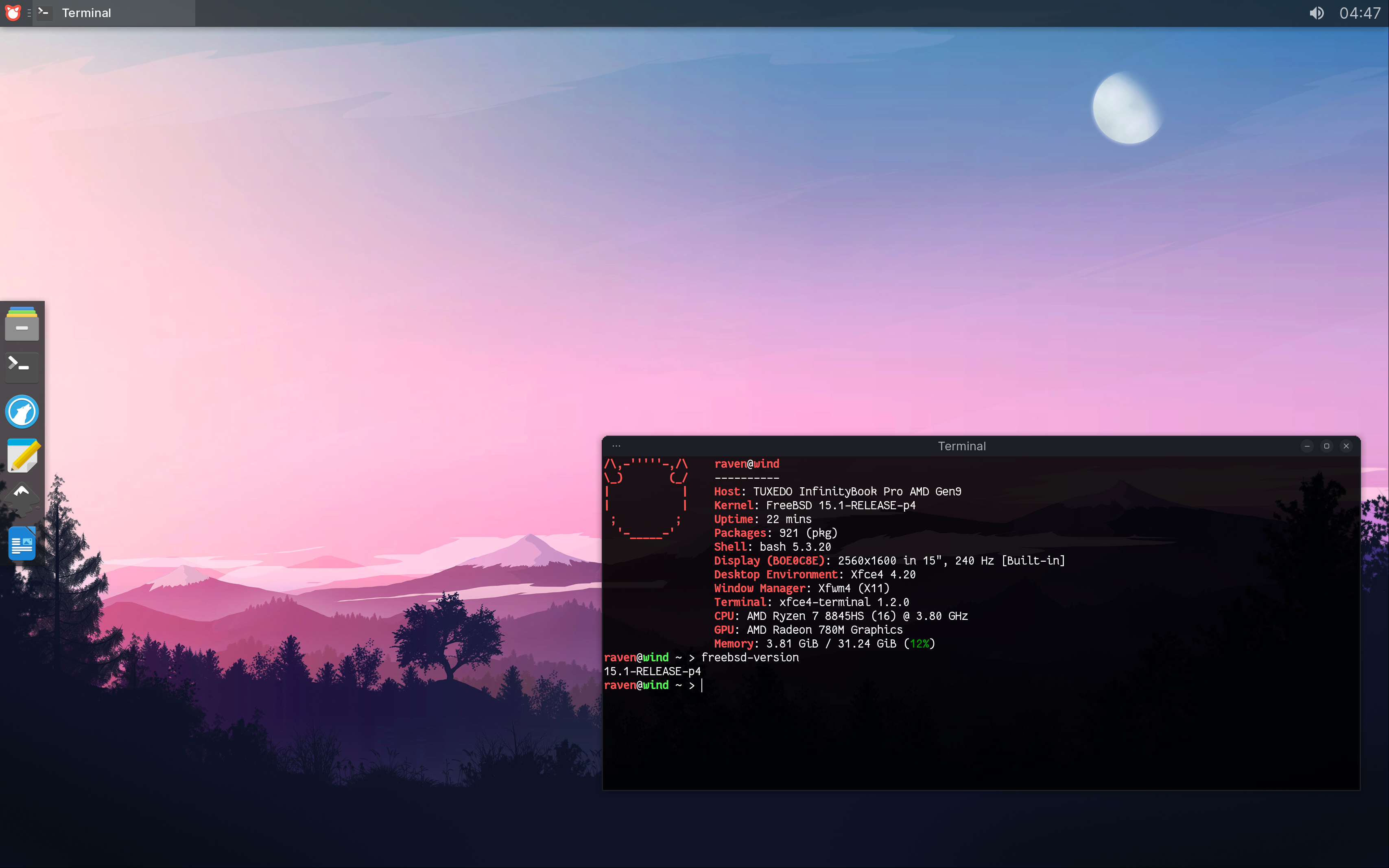
Alt...
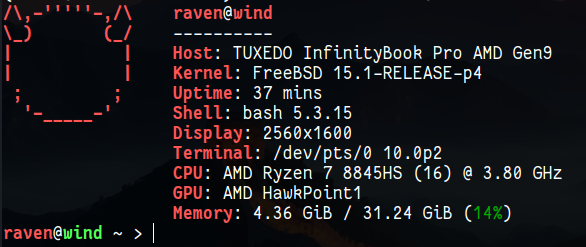
A desktop screenshot of Xfce running on FreeBSD 15.1-RELEASE-p4 on my TUXEDO InfinityBook Pro AMD Gen9
![[?]](https://media.infosec.space/infosec-space/accounts/avatars/113/605/038/999/034/961/original/d2ed8d9ebc60820e.jpeg)


the FreeBSD guys are working on a full [KDE installer [ostechnix.com]].
this interested me, so after reading that unofficial article, i looked at the Release Notes for 15.0 & 15.1, but couldn't see any particular mention of it, so i assume they hit roadblocks that have delayed it? Then after some ferreting about i found this brief info; https://wiki.freebsd.org/DesktopIntegration?highlight=%28%5CbCategoryProject%5Cb%29
Desktop-installer is a post-install script to assist in setting up a FreeBSD desktop system using any of the mainstream desktop systems. It automatically installs essential software and configures subsystems such as HAL, CUPS, etc. for typical use.
Can any resident #FreeBSD wizards hereabouts pls comment & advise on this point?
@MsDropbear42 @c64whiz @dwarmstrong
I might recommend [NomadBSD].
I don't know if it's actually still active as a project, but it's a persistent live USB image for #FreeBSD with an xfce DE. It's pretty nice to get your feet wet without actually "losing" your main machine. :D
I know the FreeBSD guys are working on a full [KDE installer]. I'm not sure what the status is, at the moment, but they're definitely making good progress.
@rl_dane wonderful info thx. alas, as someone who will not use anything sans-DE, either #NetBSD or #FreeBSD [those others are even less suitable for my limited capabilities] would pose significant challenges for me... writing as someone longterm in ArchLinux KDE Plasma & KDELinux who enjoys all her bells & whistles! @c64whiz @dwarmstrong
It's a bit clunky, but I found a script to handle it:
https://github.com/dr3mro/battery_ctrl
source:
https://forums.freebsd.org/threads/how-to-set-battery-charging-thresholds-on-laptop.79807/page-3
It seems to keep the setting after a reboot, as well. Even after a cold boot, IIRC.
#FreeBSD #BSD #RunBSD #Battery #ChargeThreshold #ChargeThresholds #threshold #thresholds
![[?]](https://media.infosec.exchange/infosec.exchange/accounts/avatars/111/867/038/214/333/074/original/948015da7238758d.jpg)
RE: https://toot.cafe/@baldur/117364953454550116
This should be read by everyone participating in the #FreeBSD LLM policy working group.
I want to publicly thank @dch
The FreeBSD port of littleFedi was already ready at release time, and it’s really well done.
One of the peculiarities of littleFedi is that it was developed and tested first on the BSDs, then on illumos, and only later on Linux.
The first public instance, my own @stefano@rpi0w.stefanomarinelli.it account, runs on a Raspberry Pi Zero W with NetBSD.
I don’t think many social platforms have started out on NetBSD in recent years.
#ThankYou #RunBSD #NetBSD #FreeBSD #OpenBSD #illumos #OwnYourData #Fediverse #littleFedi
![[?]](https://cdn.masto.host/rubysocial/accounts/avatars/000/093/360/original/920f5a8782200f9b.jpg)
Just #FYI to my #FreeBSD peeps, I've updated my [cpugov] script to try to show cpu governor (power profile) status in FreeBSD (read-only).
P.S., it now handles #NetBSD as well. It doesn't do a whole lot more than just sysctl machdep.cpu for now, but it also tries to show the latest syslog messages from powerd as well as warn you if the powerd acadapter script isn't set up to change clock speed when the power state changes (which it doesn't by default).
If anyone has any info on how to access the actual CPU governor (and not just the clock speed) in NetBSD, let me know. ;)
![[?]](https://media.bsd.cafe/bsdmmedia01/accounts/avatars/117/006/199/875/207/359/original/dfd5a542d6917324.jpeg)
As many of you know, I've been getting back into running BSD after 20 or so years away from it. I'm wanting to get NetBSD running, mainly because of the no-AI policy, but I've been struggling and its frustrated me a bit. Well, to be honest, quite a lot. To get BSD running on my desktop, laptop, and small server, and so I can move away form Linux, I'm going to go ahead and get FreeBSD up and running on my hardware. I know that they have a questionable AI policy but this will get me over to BSD and then I can move from there. Plus, FreeBSD has some really, really good documentation to get me started.
This normie had a BSD workstation in 2006! But that was thanks to PC-BSD.
https://en.wikipedia.org/wiki/TrueOS
I've never tried a "straight" BSD.
Hoping someone comes up with a PC-BSD-style normie-friendly version of NetBSD (preferably Xfce)


 🍵
🍵  boosted
![[?]](https://media.bsd.network/accounts/avatars/109/207/430/504/108/566/original/b37198ec33972825.png)
I wouldn't usually get political here, but I think it's sickening how a madman has garnered millions of pounds when there's plenty of other institutional open source projects which we rely on every day who''ll never get to this level of monetary support.
I do try in my own way to support the projects I love where I can -- #freebsd, #openbsd, #gameoftrees, etc., all of which I've put some level of money behind.
Don't neglect the power of this -- and don't listen to the hype around some fascist's projects building up millions of pounds.
Your individual support means more than you could know.
I absolutely love #gameoftrees, for example, and I know my paid for VM goes a long way to supporting that project. See? You can make a difference and not even realise it. :)
Holy moly, #GNU sed was immensely faster than #FreeBSD's #sed with the exact same command.
The BSD sed was taking minutes and not finishing at all, only writing about 64KiB of the file per second.
GNU sed finished the entire 34MiB file in a few seconds.
Weird.
rld@Intrepid:tmp$ cat access_log* |sed 's/^.*"\([^"][^"]*\)"$/\1/' >agents.txt
^C
rld@Intrepid:tmp$ cat access_log* |gsed -E 's/^.*"([^"]+)"$/\1/' >agents.txt
rld@Intrepid:tmp$
``
Not sure why, but #mpv on #FreeBSD is super stuttery now and doesn't want to play video.
Not sure what happened.
rld@Intrepid:~$ uname -srm
FreeBSD 15.1-RELEASE-p2 amd64
rld@Intrepid:~$ pkg info |grep mpv
mpv-0.41.0_1,1                 Free and open-source general-purpose video player
Tried reinstalling it and all its dependencies, but it's still doing it.
Maybe I need to employ my old adage, the very sagest advice from a hypothetical #Canadian:
"When in doot, reboot!"
Thank you, thank you, I'll be here all week. Please tip your waitstaff. 😄
Update: Nah, rebooting didn't help. it's still twitchy, basically just going back and forth between the first two frames of the video while playing audio, and showing somewhat twitchy UI. Strange.
Update 2: Upgrading to FreeBSD 15.1-RELEASE-p3 (and doing a pkg upgrade) didn't help, either.
I don't know if they're helpful, but here are my mpv error messages:
   1 rld@Intrepid:Videos$ mpv where_did_bytes_come_from_computerphile.mp4
   1 ● Video  --vid=1               (h264 1920x1080 25 fps) [default]
   1 ● Audio  --aid=1  --alang=eng  (aac 2ch 44100 Hz 126 kbps) [default]
   1 [ffmpeg/video] h264: Device does not support the VK_KHR_video_decode_queue extension!
   1 [ffmpeg/video] h264: no frame!
   1 Cannot load libcuda.so.1
   1 [ffmpeg/video] h264: Device does not support the VK_KHR_video_decode_queue extension!
   1 [ffmpeg/video] h264: Failed setup for format vulkan: hwaccel initialisation returned error.
   1 [ffmpeg/video] h264: no frame!
   1 [ffmpeg] CUDA: Cannot load libcuda.so.1
   1 [ffmpeg] CUDA: Could not dynamically load CUDA
   1 Failed to open VDPAU backend Shared object "libvdpau_nvidia.so" not found, required by "mpv"
   1 AO: [oss] 44100Hz stereo 2ch float
   1 VO: [gpu-next] 1920x1080 yuv420p
  32 [vo/gpu-next/libplacebo] vkQueueSubmit2: VK_ERROR_UNKNOWN (../src/vulkan/command.c:533)
   1 AV: 00:00:01 / 00:11:30 (0%) A-V:  0.000
   1 Exiting... (Quit)
Update 3: I got videos to play again using --vo=wlshm 🤷♂️
Hey #FreeBSD peeps,
Anyone have any tips getting #VimClassic to compile?
/usr/local/bin/ld: objects/os_unix.o: in function `mch_total_mem':
/home/rld/software/vim-classic-v8.3.0/src/os_unix.c:575:(.text+0x1111): undefined reference to `sysinfo'
collect2: error: ld returned 1 exit status
link.sh: Linking failed
*** [vim] Error code 1

make: stopped making "first" in /home/rld/software/vim-classic-v8.3.0/src
make: 1 error

make: stopped making "first" in /home/rld/software/vim-classic-v8.3.0/src
rld@Intrepid:src$ echo $?
2
Here are the commands I'm using (courtesy of a helpful person on the NetBSD matrix room, which did help me compile it on that os):
make distclean

cd src

./configure --with-features=huge --disable-darwin --disable-netbeans --enable-terminal --disable-rightleft --disable-arabic --disable-gtktest --disable-icon-cache-update --enable-multibyte --with-luajit --enable-fontset=no --enable-pythoninterp=dynamic --enable-pythoninterp=dynamic --enable-python3interp=dynamic --enable-perlinterp=dynamic --enable-mzschemeinterp=no --enable-luainterp=dynamic --enable-cscope --enable-rubyinterp=dynamic --enable-autoservername --disable-acl --disable-canberra --disable-desktop-database-update --disable-gtktest --disable-smack --disable-selinux --disable-xattr --enable-gpm=no --enable-motif-check=no --enable-gtk3-check=no --enable-gnome-check=no --enable-gtk2-check=no --without-x --enable-gui=no --enable-xim=no --disable-xsmp-interact --disable-xsmp --with-local-dir=~/bin/lib --with-python3-stable-abi=3.14 --with-python3-command=python3.14

autoreconf

make -j 4
![[?]](https://social.sdf.org/system/accounts/avatars/111/195/475/392/967/796/original/c4c181f822b0db6c.png)
DaemonForums is offline as its owner/administrator j65nko is terminally ill and in the hospital. DaemonForums was a *BSD forum and community for nearly 20 years, a replacement when BSDForums was taken over by spambots around 2008. There was a lot of good information and discussion there over the years. https://forums.freebsd.org/threads/daemonforums.103642/ #freebsd #openbsd #netbsd #bsd #daemonforums
EDIT: the recording is available here: https://exquisite.tube/w/nQbc54t4G7YGaqiryZ7mg1
On 10 March 2021, I had only just fallen asleep when my phone started buzzing. Then another notification, and another. In a matter of minutes, 142 of my servers went up in the clouds. And not the cloud-computing kind.
Most of them were physically going up in a column of smoke in Strasbourg.
My wife looked at me and asked if I wanted a coffee. I nodded. It was going to be a very long day.
At EuroBSDCon 2026, I won't be giving a theoretical lecture on high availability. Instead, I’m going to tell the raw story of that night: the emergency recovery, the architectural choices that actually saved us, and the ones that crumbled under pressure (because we rarely talk about what fails).
Most of all, I’ll explain why that night changed my perspective, and why I’ve come to see BSD systems not just as operating systems, but as essential, practical tools for building simpler, more resilient infrastructure.
The official schedule is now live. If you want to hear a real-world post-mortem, join me on Saturday, 12 Sept at 11:15 (Room D.0.02).
EuroBSDCon Full schedule: https://events.eurobsdcon.org/2026/schedule/
See you there! ☕️
#FreeBSD #NetBSD #OpenBSD #DragonFlyBSD #RunBSD #EuroBSDCon #SysAdmin #SelfHosted #IT #EuroBSDCon2026 #BSDCon
Maybe you learned #VHDL in the interim. (-:
Uh, NO, do you see me staring far off into the distance and drooling? 😂
By the way, you made me re-visit the doco for case. It should be ;& (just the one semi-colon) to fall through in all sh-conforming shells, because that was standardized back in 2024. #NetBSD and #FreeBSD knew it was coming in 2017 and adjusted their Almquist shells.
And I realized that I've been writing for a highest common factor that is actually too low, because the #FreeBSD manual for sh(1) is wrong. They kept the shell conformant, but didn't keep the doco in synch.
Huh, I tried sh, ksh, mksh, and bash with ;;, ;&, ;;&, and ;| on NetBSD, and the only ones that worked were bash and ksh.
(Ok, I see how I miscommunicated here. I meant the only ones where ;;& or ;| worked, not ;&)
On this Devuan box, bash accepts ;;, ;&, and ;;& just as the manpage states (short-cut, accept all after first accpetance, evalute all, respectively)
mksh works just like bash, but also accepts ;| as equivalent to bash's ;;& (which it also accepts)
Dash's sh (debian almquist) only accepts ;;, and gives an execution-stopping syntax error with all of the other forms.
On a freebsd server I tried, ksh (ksh93) only accepts ;; and ;&. sh acts the same. Tried an OpenBSD server and got the same result.
Here's the test script:
echo
echo 'trying ;;'
case a in a) echo its a;; b) echo its b;; *) echo its something;; esac
echo
echo 'trying ;&'
case a in a) echo its a;& b) echo its b;& *) echo its something;& esac
echo
echo 'trying ;;&'
case a in a) echo its a;;& b) echo its b;;& *) echo its something;;& esac
echo
echo 'trying ;|'
case a in a) echo its a;| b) echo its b;| *) echo its something;| esac
![[?]](https://files.flyovercountry.social/accounts/avatars/109/390/372/615/478/805/original/d3353c377531a46c.jpg)
This is pretty funny, apparently my announcement of the 14.5-R torrents being available made some people aware that I also have 15.1-R torrents as well. Right now my most active release is 15.1-R, with no activity on 14.5-R (there have been a few uploads that have happened in the last half day or so).
![[?]](https://snac.chasmcity.net/gmc/s/avatar-39a28207b803e450badeee8cec677bc1.jpg)

The FreeBSD 14.5-R magnet links are now published.
As usual, DHT can take some time to propagate, so give it time.
![[?]](https://hub.netzgemeinde.eu/photo/profile/l/1035?rev=1729019402)
The Linux mainline kernel itself contains AI code now. It's officially allowed as long as it's disclosed as such. Thus, you will have to avoid literally all servers running on Linux.
https://docs.kernel.org/process/coding-assistants.html
NetBSD has very strict rules regarding AI-generated code. But it doesn't rule AI-generated code out out of principle because it's AI-generated; it only wants to be safe that nothing that's actually GPL-licensed is slipped in. So, if you're an 100%, ultra-hardcode anti-AI extremist, avoid what few servers run on NetBSD.
https://www.netbsd.org/developers/commit-guidelines.html
OpenBSD contains AI-generated code, too. And it has no official stance regarding it. So servers running on OpenBSD are taboo, too.
https://www.osnews.com/story/144935/openbsd-and-slopcode-raindrop-to-a-torrent/
FreeBSD has no stance on AI whatsoever that I could find. However, apparently, the FreeBSD community loves to integrate Claude Code into their systems for automation purposes:
https://aumont.fr/posts/claude-code-freebsd/
https://discoverbsd.com/p/8a7660c31b
But you'll also have to look at the userland, the Web server, the database driver etc.
MariaDB allows AI code. You can safely assume that all MySQL databases on Web servers out there are actually powered by MariaDB.
https://mariadb.org/governance/governance-ai-policy/
Oracle MySQL can integrate AI, so it's safe to assume it contains AI-generated code.
https://blogs.oracle.com/mysql/announcing-mysql-ai
PostgreSQL probably allows AI code, too. There are even tools for it.
https://github.com/timescale/pg-aiguide
SQLite is very popular amongst AI users while not having any rules on AI-generated code. Assume it to be tainted.
This leaves you with only one choice: Self-hosting a personal, single-user snac2 server because snac2 doesn't need any database whatsoever. In fact, snac2 is staunchly against AI. And it runs on NetBSD.
https://codeberg.org/grunfink/snac2
But then there's the Web server. Apache may allow AI-generated code if it has been reviewed and made sure that it does not contain anything that's incompatible with the Apache-2.0 license.
https://www.apache.org/legal/generative-tooling.html
nginx welcomes AI and advertises itself as ready for AI, and it takes no anti-AI-code stance. It's most likely already tainted.
https://www.f5.com/de_de/products/nginx.
This basically leaves you with no Web server guaranteed to be 100% free from AI-generated code to run snac2 on. But that doesn't matter because it's impossible to build a Web server devoid of any AI code to install snac2 on.
By the way: Mastodon itself explicitly allows AI code if it's disclosed as such, and if its contributor understands it.
https://github.com/mastodon/.github/blob/main/AI_POLICY.md
In other words, next to all Mastodon servers are running
- AI-generated Mastodon code
- on an AI-generated Web server
- with an AI-generated database driver
- on an AI-generated operating system kernel
#Long #LongPost #CWLong #CWLongPost #FediMeta #FediverseMeta #CWFediMeta #CWFediverseMeta #Linux #FreeBSD #OpenBSD #NetBSD #Apache #nginx #MySQL #MariaDB #PostgreSQL #SQLite #Mastodon #snac2 #AI #LLM #LLMs #GenAI #NoAI #AntiAI #AntiLLM
More #NetBSD thoughts:
I'm an #i3wm / #sway or #KDE #Plasma guy. I tried #OpenBSD's default wm for about a minute, but it was just too jarring for me. I also used #cwm for a while, and it's actually nicely configurable, but I eventually reverted to i3 on OpenBSD. I haven't tried Sway yet, but #Wayland's supposedly working in "Fish Linux" now. ;)
But #ctwm? Look, it's pretty ancient, and it's not a totally perfect fit for my worfklow, but I'm actually kinda diggin' it!
It's also probably the most attractive default GUI of any of the BSDs, considering that obsd gives you a pretty loud bright red or bright blue titlebar motif-looking thing (not knocking motif, just the primary color choice), and #FreeBSD gives you (checks notes) no GUI by default. XD
ctwm isn't quite as flexible as i3/sway, but it's just configurable enough to keep me coming back and tinkering away at it. The way the warpring function (alt+tab, in other words) works is pretty obtuse (only moving forward or backward in the window list, never re-ordering based on recency), but once I learned how to exclude windows (X11 classes or window titles) from the warpring, it became a ton more usable.
I also figured out how to enable active titlebar highlight (it drives me nuts when that's disabled or very subtle, how do you even not understand that basic tenet of usability?) and even how to assign an xpm image to the titlebar so it looks pretty.
Fun stuff!
I should post another screenshot. ;)
![[?]](https://cdn.social.linux.pizza/system/accounts/avatars/114/418/135/965/162/614/original/90fe78a1af973214.jpg)
On a different note: the first day of FreeBSD'ing was nice. Of course the windowmanager setup with Mango and Wayland needs some more attention at first (default sound, pipewire etc. you get it), but that KDE rocks already. An advantage of a DE: lock, stock and barrel included (mostly). In the workday all went smooth, including Joplin and Signal. Good stuff!
#freebsd
I'm not going to pretend that running BSD is a cakewalk, but particularly for #FreeBSD, there are lots of really helpful folks on the #fediverse.
Also, the FreeBSD handbook is amazingly good.
--Sent from my nearly ten year old hand-me-down inspiron running #NetBSD ;)
RE: https://chaos.social/@txt_file/117173096944928199
So, just over a week till the release. I'll be generating magnet links again for this release.
![[?]](https://polymaths.social/fileserver/01J5M0ZN4YQN00E8Y8SCB09GBM/attachment/original/01JXCNZNZS0TRJF52JH0MT48BB.png)
I run gkrellm everywhere. Even on closed Source operating systems. The dashboard is designed in such a way that I can just glance and know if something is wrong, if some process pulls way too much, and then I get in with htop to granularly see what's going on
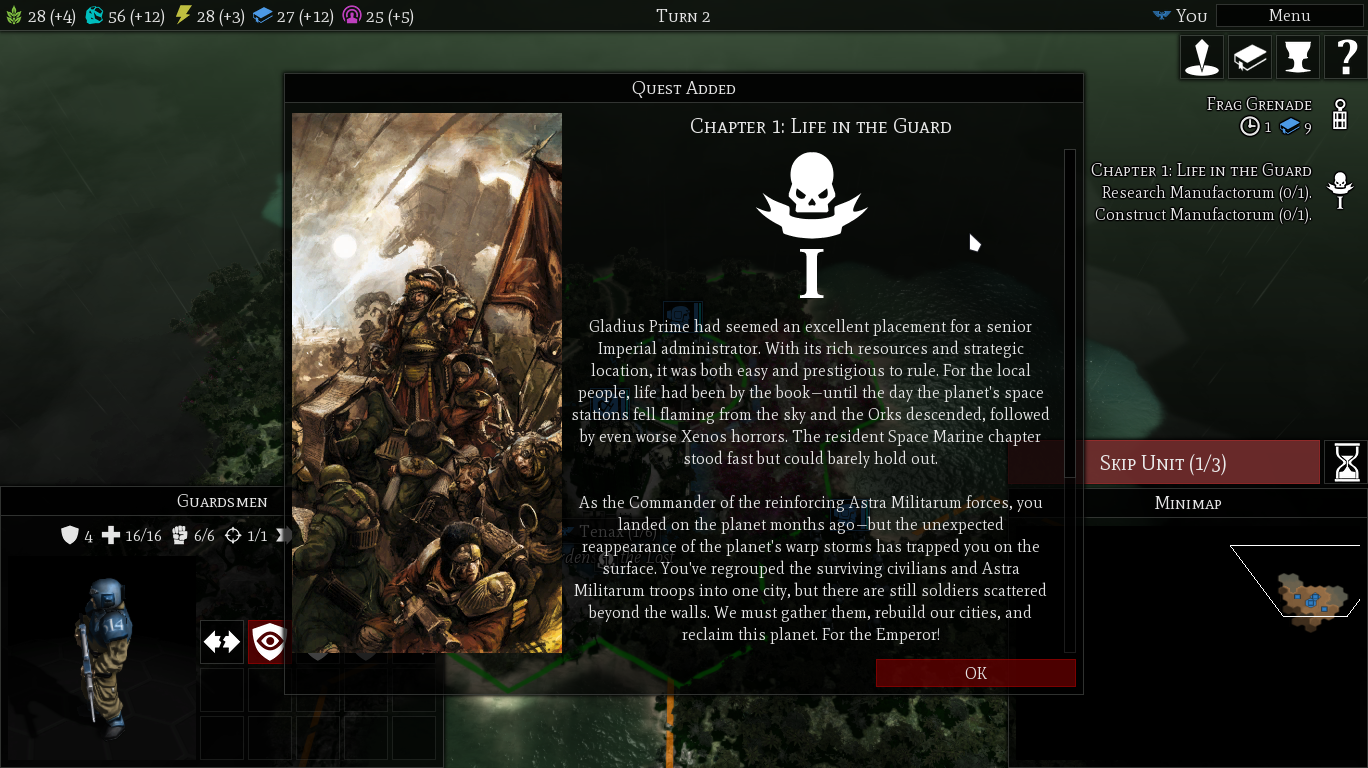
Gladius, that previously crashed on Ghostbsd, now works perfectly with Vulkan that works correctly.
#bsd #ghostbsd #freebsd #pcgaming #w40k #gladius #videogame #videogames
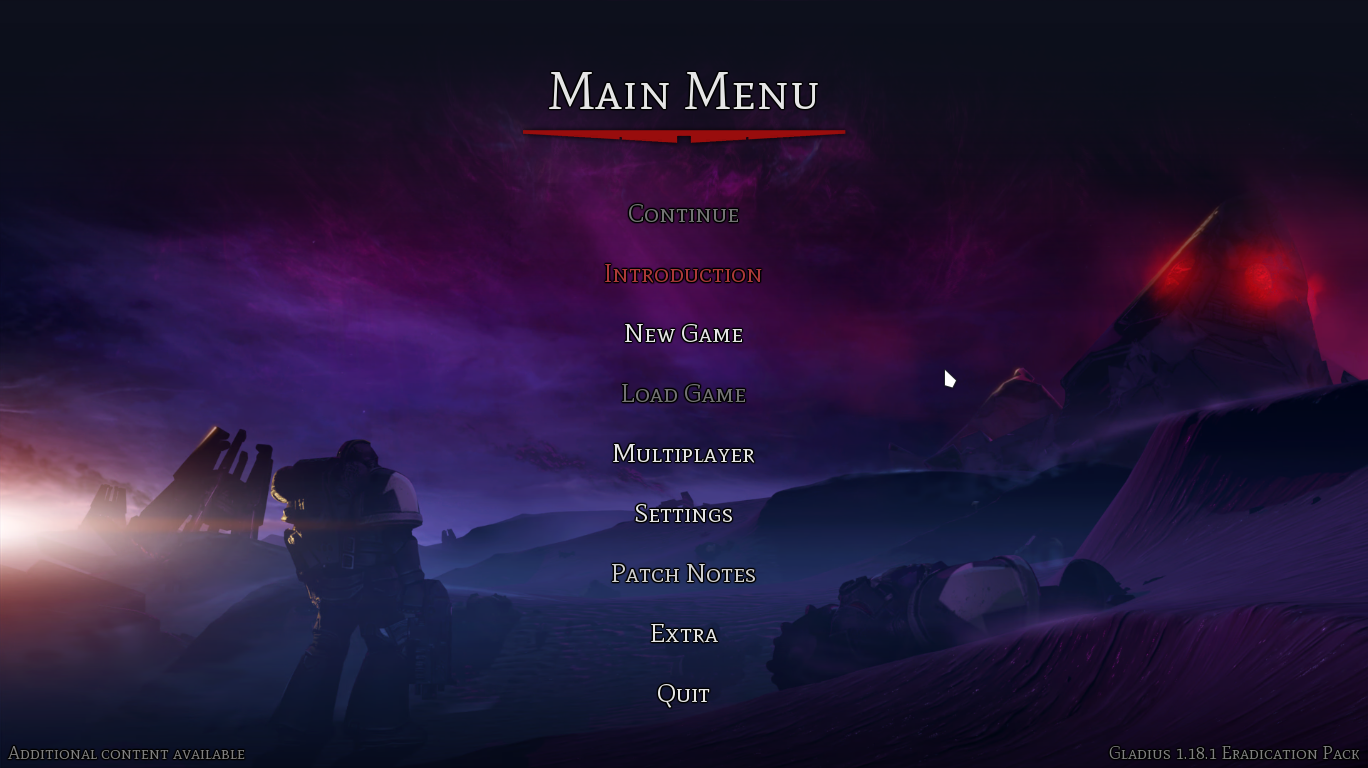
Alt...
Gladius running on GhostBSD with the Linux native port.

Alt...
Gladius running on GhostBSD with the Linux native port.
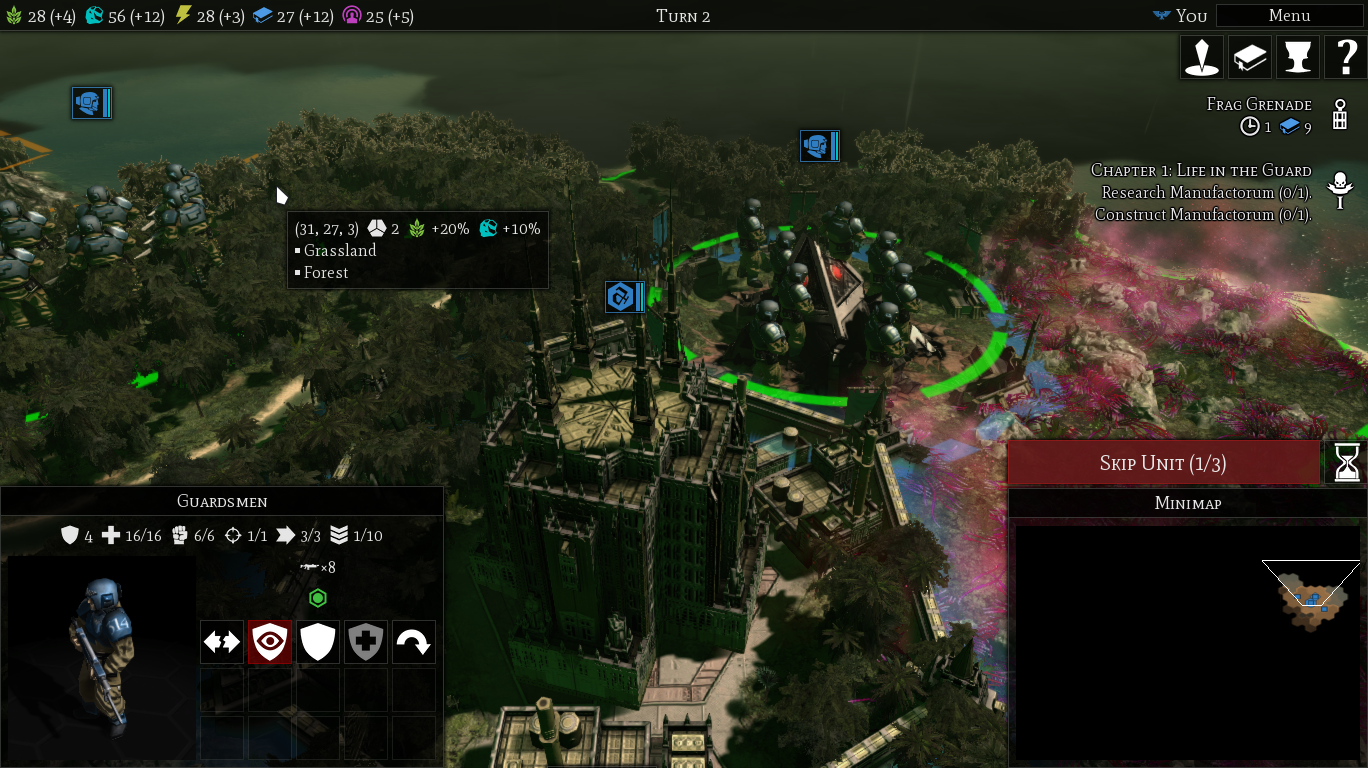
Alt...
Gladius running on GhostBSD with the Linux native port.
Alt...
Gladius running on GhostBSD with the Linux native port.
The constant arms race between #google and #yt-dlp is amusing to watch, in a tragic sense.
Came very close to running the somewhat scary "curl ${some_url} |sh" install "procedure" for #deno on my #devuan box until I saw that yt-dlp had been updated only yesterday.
I don't know why #debian (upstream) doesn't package Deno like #FreeBSD does.
boostedTried two games with the Linux port under Ghostbsd.
- Gladius: relics of war, caused a crash of the entire session and I got kicked to the login manager...
Great.
https://store.steampowered.com/app/489630/Warhammer_40000_Gladius__Relics_of_War/
#POLL Results:
44 people are in deep denial about their existential dread, and should consult a counselor and read #Kierkegaard immediately 😁
139 people like teh pretty tings, and can't be bothered
188 people have started down the path towards enlightment
354 people are cool_kids
92 people are very_cool_kids
55 people laugh at your inadequate security model
27 people can run a server on a bit of bailing wire and a microcontroller from 1987 — fear them.
26 people are keeping Gassée's dream alive, and are plenny cool in my book
4 people are totally cool, and totally in a class by themselves
and 21 people kinda scare me, but I'd like to know more. 🤣
#humor #humour #houmor #houmour
#Windows #MacOS #Linux #CommandLine #BSD #RunBSD #FreeBSD #OpenBSD #NetBSD #Haiku #HaikuOS #BeOS #Amiga #Workbench #AROS #AmigaOS #Plan9 #9Front #TempleOS
P.S., wherever you find yourself, you're awesome. This is all for fun.
![[?]](https://snac.smithies.me.uk/justine/s/avatar-270304302821a87b50026a5768a00c56.png)
#FreeBSD #RunBSD
https://codeberg.org/thomasadam/cow

![[?]](https://media.infosec.exchange/infosec.exchange/accounts/avatars/108/195/621/247/550/549/original/d96204cc09c9dbfe.jpg)
Update on the FreeBSD ports cleanup after someone committed a 150M blob of the Linux Copilot CLI:
https://lists.freebsd.org/archives/freebsd-announce/2026-July/000295.html
Good as far as it goes, especially the striving for transparency, reproducibility, and minimizing downstream impacts. ❤️
Notably missing, however:
- an explanation of how it happened in the first place
- concrete steps that will be taken to prevent it from happen again
Edit: downthread there are references to the broad plan -- pre-commit hooks based on size, and other guardrails. I'm advocating to over-communicate that effort (but very happy with everything else!)
Message is in the package readme, but if those updates are automated, you'll start scratching your head why things have just stopped working.
Details: https://cgit.freebsd.org/ports/commit/security/openssh-portable/Makefile?id=fad4f7d3cf4db1a8cf6a748c0bdc9d6d0b3321a1

With Apple phasing out AFP in macOS 27 and Time Capsules officially reaching end-of-life, it's time to move network backups to proper SMB.
If you run a FreeBSD server, you can build a fast, rock-solid, and secure Time Machine target powered by ZFS and Samba - neatly isolated inside a FreeBSD jail using Bastille.
https://it-notes.dragas.net/2026/01/28/time-machine-freebsd-jail/
Keep your macOS backups running smoothly via SMBv3 (with full vfs_fruit support) and full dataset quota control on ZFS!
#FreeBSD #macOS #TimeMachine #ZFS #BastilleBSD #Samba #SysAdmin #Backup #OwnYourData #SelfHosted #BSD #RunBSD #OwnYourData

Alt...
A screenshot of my Cow ( FVWM for Wayland ) desktop that runs on the River compositor. The wallpaper shows a green meadow with flowers and a girl lying down staring at the sky. In the background are snow peaked mountains. There is a terminal window open with the Cow menus open and a qutebrowser window that is shaded.
https://codeberg.org/thomasadam/cow
#Wayland #fvwm #CoW #RiverWM #FreeBSD

The #FreeBSD experience is a lot like the Linux experience... in 1999. ;)
So, you don't get any kind of a GUI (or even Wifi) working out-of-the-box, but the official handbook is a dream to work with, and they take you through the steps of getting it working quite easily.
The major version upgrade (14.x->15.0) was a non-starter, but they make it stupid easy to roll back to a previous version basically instantaneously.
The package system has tons and tons of packages, such that I never really missed things like flatpak. The only problem is that many packages are needing maintainers, but that never gave me any major problems. (I should really volunteer but... skill issue, maybe? ;)
As always, the answer to the fear of losing time when converting main machine over to a new-to-you OS is to just put it on a side machine and enjoy playing with it, and see if it becomes more of a main machine.
Touching the topic of music production, though, I have no idea. I'm not even really familiar with how the sound server works, but I know that pipewire and jack are in the repos.
It's been the OS installed on the computer I use the most at home since November, so, yes, mostly.
I have Debian on my work machine and OpenSuSE on my "gaming" SFF desktop.
Also have #OpenBSD on my old X200t, and am just getting started with #NetBSD on a hand-me-down Inspiron.
I love hand-me-down laptops. 😁
Woot, FINALLY!
rld@Intrepid:~$ uname -a
FreeBSD Intrepid 15.1-RELEASE-p2 FreeBSD 15.1-RELEASE-p2 releng/15.1-n283596-aadd58dddcbc GENERIC amd64
No more networking issues, and drm (graphics) didn't work at first, but then sorted itself out.
🤷♂️ Mmmmmkay!!! 😄
Oh and why yes I'm still using CoW ( Wayland and behaves like fvwm by @thomasadam@bsd.network ) as my Window manager and loving it's many many configurations. This could take me a wee while to get just how I'd like but definitely loving that retro vibe!
#FreeBSD #Wayland #CoW #pkgbase

![[?]](https://files.mastodon.social/accounts/avatars/000/038/659/original/b0de8058da52f2aa.jpg)
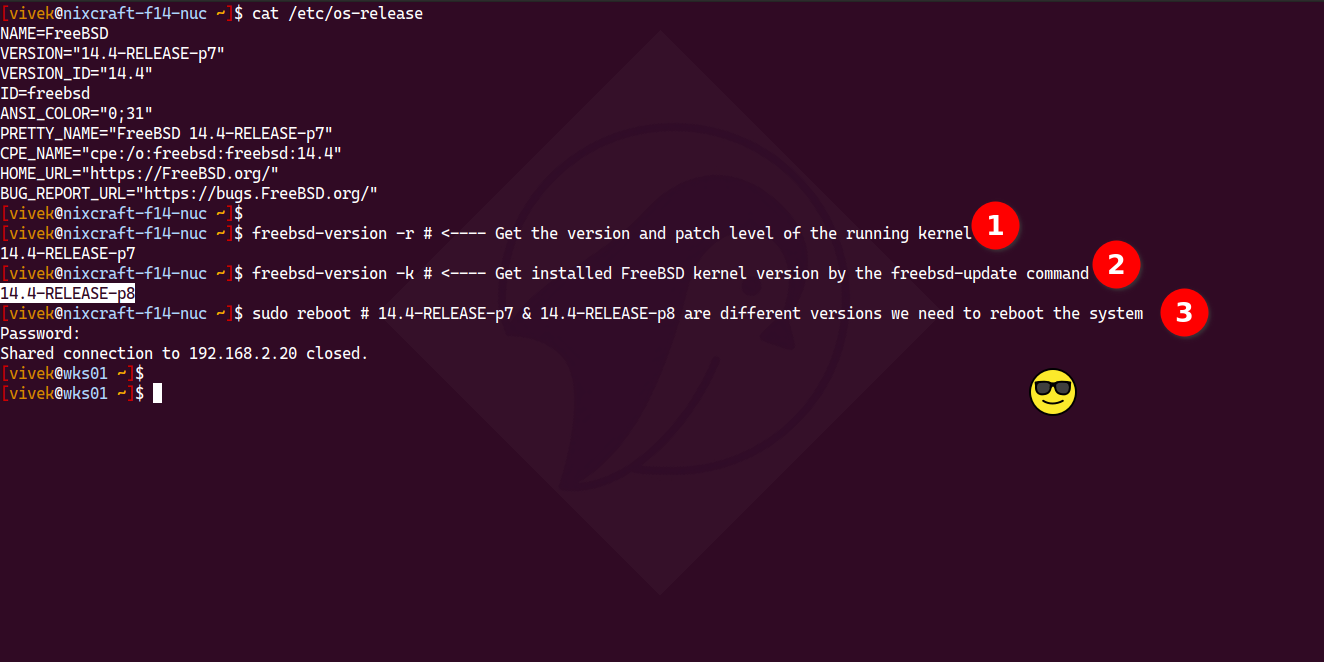
The key to knowing if a FreeBSD box reboot is needed lies in comparing the installed kernel version with the currently running kernel version. How do you do that?
1 Get the version of the running kernel:
`freebsd-version -r`
2 Get installed FreeBSD kernel version:
`freebsd-version -k`
3 Since 14.4-RELEASE-p7 & 14.4-RELEASE-p8 are different versions, reboot it
`sudo reboot`
More here if you want to do this in automated way with ansible https://www.cyberciti.biz/faq/freebsd-determine-if-a-system-reboot-is-necessary/
Alt...
The terminal screenshot showing FreeBSD commands to check kernel versions and reboot the system by running:
freebsd-version -r # <---- Get the version and patch level of the running kernel
freebsd-version -k # <---- Get installed FreeBSD kernel version by the freebsd-update command
sudo reboot # 14.4-RELEASE-p7 & 14.4-RELEASE-p8 are different versions we need to reboot the system
Who here still uses fvwm and why?
Even better share with us your fvwm desktop screenshots.
Obviously to see what it's all about and if I could even go back to a stacking window manager.
PS: I have not yet customised the theme it's the out of the box theme.
https://codeberg.org/thomasadam/cow
#CoW #River #Wayland #fvwm #FreeBSD

Alt...
A screenshot of the CoW ( Compositor on Wayland ) desktop showing the Qutebrowser window and the terminal foot with a fastfetch output displaying the wm as River
pkgbasify and it all works. Only another 7 working jails to do and the host Beastie of course. So if I do decide to fully go for it tonight, You'll know what's wrong if I suddenly drop offline. 🤣#FreeBSD #pkgbasify #pkgbase
![[?]](https://social-coop-media.ams3.cdn.digitaloceanspaces.com/accounts/avatars/114/815/232/682/603/407/original/8ee432595902a513.png)
I am not a technical user so this may seem like a silly question, #freebsd friends. I have a computer that has a Broadcom wireless chip. What I’ve read is that in FreeBSD, Broadcom drivers are generally less supported than Intel chipsets. Is this because of anything other than resource allocation? Is there anything specific with Broadcom stuff that makes them more difficult to work with?
Follow up question, is there a driver bounty program that people could contribute to? Allocate some resources to get some better drivers?
Just realized that the only device I use regularly that doesn't have significant BSD code in it is my android phone.
Devices I use regularly/interact dirdctly with [Free]BSD on them:
✅ macos
✅ PS5
✅ Personal FreeBSD server
And at work as well.
Which of course entered the cursed thought of porting android over to FreeBSD.
![[?]](https://media.bsd.cafe/bsdmmedia01/accounts/avatars/110/897/841/857/820/580/original/440da7fe4ff168a8.webp)
So I wanted to share with you this little project of mine. I delved into "retro-necromancy" and reanimated one very old UNIX utility called ile written by Robert Pendleton in 1988. I found it on one of the Walnut Creek source code CDs from 1994.
What it does is simply works like an input line editor (hence ile) for shells and programs that do not support interactive line editing. To put it simply, it adds Emacs-style keybindings like ^A, ^E, ^K, ^U and so on and command history that you can easily navigate.
Of course, these days it's hard to find a shell that doesn't support line editing.
But this little tool can still be usable, for example, with ed. It's nice to have Emacs-style editing in ed.
It can work like shell replacement or just run like a "middleman" between any given program. It respects terminal settings and doesn't get in a way. Keybindings are configurable.
Needless to say, the code from 1988 wouldn't run on any modern system. It was written in K&R style because there was no ANSI C standard yet! And #UNIX was quite a different beast back then.
So I ported it to modern systems, rewrote outdated bits (like sgttyb ioctls and brutal utmp handling).
Currently it builds and runs on #Linux, #OpenBSD, #FreeBSD and #NetBSD. Hopefully without too much bugs.
You can find it on Codeberg:
https://codeberg.org/chesheer/ile
This is what I put in my
/boot/loader.conf:# Terminal vt(4) Gruvbox colors
kern.vt.color.0.rgb="#000000"
kern.vt.color.1.rgb="#cc241d"
kern.vt.color.2.rgb="#98971a"
kern.vt.color.3.rgb="#d79921"
kern.vt.color.4.rgb="#458588"
kern.vt.color.5.rgb="#b16286"
kern.vt.color.6.rgb="#689d6a"
kern.vt.color.7.rgb="#a89984"
kern.vt.color.8.rgb="#928374"
kern.vt.color.9.rgb="#fb4934"
kern.vt.color.10.rgb="#b8bb26"
kern.vt.color.11.rgb="#fabd2f"
kern.vt.color.12.rgb="#83a598"
kern.vt.color.13.rgb="#d3869b"
kern.vt.color.14.rgb="#8ec07c"
kern.vt.color.15.rgb="#ebdbb2"
Wow, #newsboat is actually pretty usable at 1200 #baud! #respect! :D (sent from tootme on my #FreeBSD #thinkpad running at 110 baud 😄) — #microblogging #MicroToot: 137 characters
Hmm, since I have a ssh based ggate client, I realized I could put that code into the kernel. It's like iSCSI, but over ssh.