Search results for tag #privacy
![[?]](https://media.infosec.exchange/infosec.exchange/accounts/avatars/110/560/511/618/170/134/original/4f33ba36608d1311.png)
Engadget: Is Microsoft Teams really going to start tracking employee locations? https://www.engadget.com/2209430/microsoft-teams-tracking-employee-location/ @Engadget #Microsoft #Teams #privacy
![[?]](https://media.mastodon.scot/accounts/avatars/109/292/789/959/491/021/original/897abafb8d23e660.jpeg)
I shopped at Tesco yesterday and was left extremely irritated - I had left my club card at home my trousers (changed clothes as warm and sunny). Without knowing that magic number you can’t use scan-as-you shop, but worse all the price labels taunt you about the substantial discounts giving up your privacy comes with. I bought only the essentials. I’d have picked Asda if I’d realised in time. #Tesco #Privacy #LoyaltyCards
![[?]](https://files.mastodon.social/accounts/avatars/116/693/045/271/705/560/original/1cee72f98eb9d4b4.png)
The closure of the Strait of Hormuz is not a supply shock—it is a permanent, calculated strategy. As fuel prices hit impossible highs, Big Tech is orchestrating a trauma-based transition to kill the combustion engine. The goal is to replace vehicles with biometric surveillance chambers to harvest your biological data. #SystemicRisk #BigTech #Hormuz #Privacy

Alt...
The image depicts a group of prominent figures—including Donald Trump, Benjamin Netanyahu, and Peter Thiel—gathered around a glowing, digital-like globe beneath the Palantir logo. It illustrates a convergence of political and technological power, suggesting strategic control over global data and geopolitical systems.
![[?]](https://files.mastodon.social/accounts/avatars/108/165/053/108/220/032/original/6e756e7c269ed2b0.png)
Your Grocery Store Is Tracking Your License Plate and Sharing It With The Police: Local Retailers Use Flock Cameras
Home Depot and Lowe’s integrate Flock cameras into law enforcement networks, enabling immigration enforcement searches.
#flocksafety #alpr #Lowes #HomeDepot #retail #surveillance #privacy
![[?]](https://media.infosec.exchange/infosec.exchange/accounts/avatars/114/372/473/711/554/045/original/336266689a6c5f66.jpg)


"Mistral Vibe review"
"Mistral Vibe packs agentic work automation and cloud coding into one assistant, with strong privacy guarantees and API pricing that undercuts most rivals."
![[?]](https://nbg1.your-objectstorage.com/tno-mastodon/accounts/avatars/111/434/264/745/920/273/original/52ff85db085a2a1d.jpg)
#Meta’s glasses will turn off the camera if you tamper with the #privacy light
https://www.theverge.com/gadgets/962514/meta-privacy-light-tampering-smart-glasses-update
The face of digital silence. This operation transforms professional networks into a paramilitary apparatus for mass biometric data extraction. User privacy is being weaponized to feed corporate and state surveillance agendas. This is not networking; it is a systematic betrayal of trust. We are the fuel for their control machine. Time to break the silence. #Privacy #Surveillance #BigTech #DataRights

Alt...
"The architect of digital silence. Weaponizing private data for paramilitary control, turning professional networks into surveillance apparatuses. Accountability is coming.
![[?]](https://files.mastodon.social/accounts/avatars/108/243/340/664/949/652/original/d4175ecdd0540a79.jpg)
A poke in the eye with a sharp stick.
Connecting The Meta Privacy Dots
#Meta #AI #Privacy
https://warnercrocker.com/2026/07/09/connecting-the-meta-privacy-dots/
A poke in the eye with a sharp stick.
Connecting The Meta Privacy Dots
#Meta #AI #Privacy
warnercrocker.com/2026/07/09/con…
A plea in the eye with a sharp stick.
Connecting The Meta Privacy Dots
#Meta #AI #Privacy
warnercrocker.com/2026/07/09/con…
![[?]](https://cdn.fosstodon.org/accounts/avatars/116/080/476/033/060/022/original/a398437b1d358d8b.jpg)
Lenovo Libreboot + Qubes OS + UFW kill-switch & OpenSnitch. Traffic: VLESS Reality/QUIC to personal off-shore VPS (paid via Monero). Metadata obfuscation: DoQ via Unbound with traffic padding & decay to break timing analysis. Browsing: Whonix/LibreWolf (no closed-source anti-detects). Full E2EE on client side before text hits the net. Completely invisible to deep SORM on cable, fully autonomous from hardware to endpoint. The ultimate FOSS privacy stack
#Privacy #FOSS #Security #SelfHosted

Alt...
web transmission stack defense
![[?]](https://files.mastodon.social/accounts/avatars/116/803/569/854/912/671/original/1304f0108d03e4d9.png)
It genuinely terrifies me how quickly we've normalized our own devices spying on us. First it was targeted ads, now it's legislation to scan our private photos before they even leave the phone. Privacy isn't a crime, it's a boundary. I'm moving as much of my life as possible to open-source E2EE apps this year.
![[?]](https://files.mastodon.social/accounts/avatars/116/751/863/753/392/750/original/be14ea1ddc815e7d.png)
Lenders keep your SSN, pay stubs, and financial statements indefinitely — and that permanent store is a breach target shared with affiliates and brokers. Unlike a password, a leaked SSN is something you can never change.
#Windows Drops Under 60% in Global Desktop OS Share for the First Time in Years
https://linuxiac.com/windows-drops-under-60-in-global-desktop-os-share-for-the-first-time-in-years/
![[?]](data:image/png;base64, iVBORw0KGgoAAAANSUhEUgAAAEAAAABAAQAAAACCEkxzAAAAUUlEQVQoz43R0QkAMQwCUDdw/y3dwEvsvzlL4X1IoQkAisKmwfAFT3RgJHbQezpSRoXEqeqCL9BJBf7h3QbOCCxV5EVWMEMwG7K1/WODtlvxAYTtEsDU9F34AAAAAElFTkSuQmCC)
Can't apply for jobs without agreeing to privacy policy, agreeing to spam calls and emails. How do we fix this?
I’ve heard of people getting VOIP numbers but not sure how this works.
I tried to get an extra number to forward, but those sites ask you to agree to the same privacy violations. I’m so pissed.
What can we do to recieve phone calls for jobs without signing up for endless spam?
![[?]](https://media.infosec.exchange/infosec.exchange/accounts/avatars/116/755/944/127/402/141/original/ac59064ece551f1c.png)
An open-source client + https://nullsink.is/ = frontier models with nothing attached to you.
No account, no IP, no request logs.
Learn how to set nullsink up with Open WebUI: https://github.com/nullsink/nullsink/blob/main/docs/openwebui.md
![[?]](https://cdn.fosstodon.org/accounts/avatars/111/037/140/931/265/493/original/4efd2d3bf57a0bb7.jpg)
Self-Host Weekly (10 July 2026)
Online reactions to #AI, software updates and launches, a spotlight on #TypeType - a privacy stack for #YouTube, and more in this week's #selfhosted recap!
https://selfh.st/weekly/2026-07-10/
#selfhost #selfhosting #opensource #foss #homelab #devops #sysadmin #privacy #newsletter #fediverse #homeassistant #smarthome #immich #photos #feed #app #apps #lemmy #hackernews
![[?]](https://media.metalhead.club/accounts/avatars/116/383/703/220/528/311/original/2e1398d11e673067.jpg)
Why isn't Proton Mail or Proton Calendar available on F-Droid? 🤔
Both are privacy-focused apps, so it seems like a natural fit for the FOSS ecosystem. Anyone know if there's an unofficial repo or mirror where these can be found?
Looking for transparency on this!
![[?]](https://files.mastodon.social/accounts/avatars/115/742/434/865/105/205/original/ba2fa15026c28d18.jpeg)
DuckDuckGo's browser can now block most YouTube video ads without requiring a separate extension.
The feature is rolling out across supported platforms, though DuckDuckGo notes you may occasionally see buffering or ads as YouTube changes how ads are delivered.
Read more: https://digitalescapetools.com/2026/07/duckduckgo-youtube-ad-blocking-browser.html
![[?]](https://files.mastodon.social/accounts/avatars/000/592/998/original/755535a2455fe7f4.jpeg)
Is there a central name-and-shame place to list apps and vendors which enforce "genuine" Google #Android? Users of #microG are increasingly confronted with these warnings and #nags that are transitively forced upon us by idiots in Silicon Valley.
This is not #Google caring about our security. This is #Google caring about their power and grip on society, far outside what they should be able to reach.
#sovereignty #digitalsovereignty #gafam #privacy
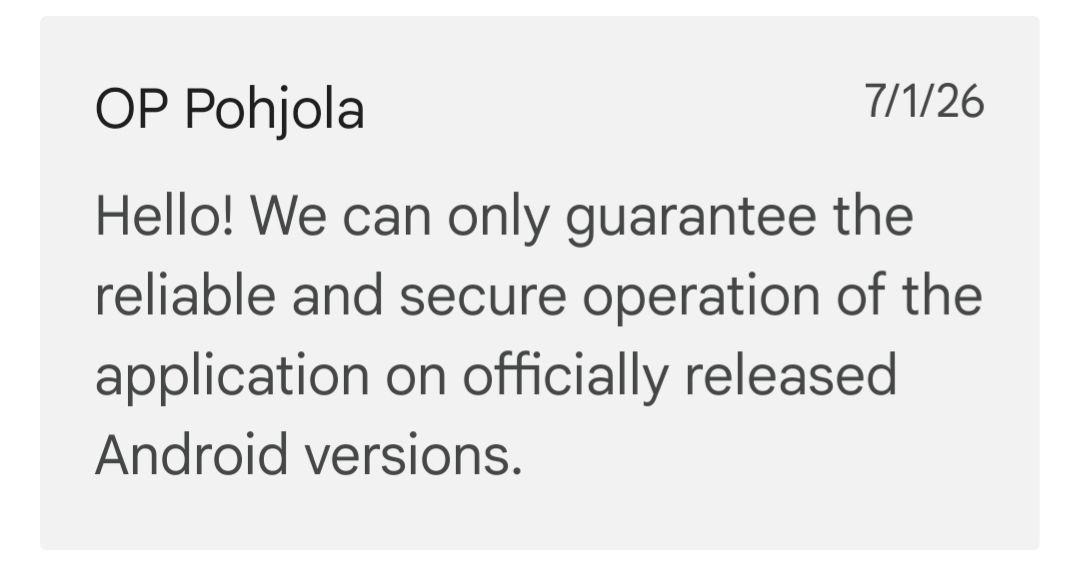
Alt...
Screenshot from a conversation:
OP Pohjola 71/26
Hello! We can only guarantee the
reliable and secure operation of the
application on officially released
Android versions.
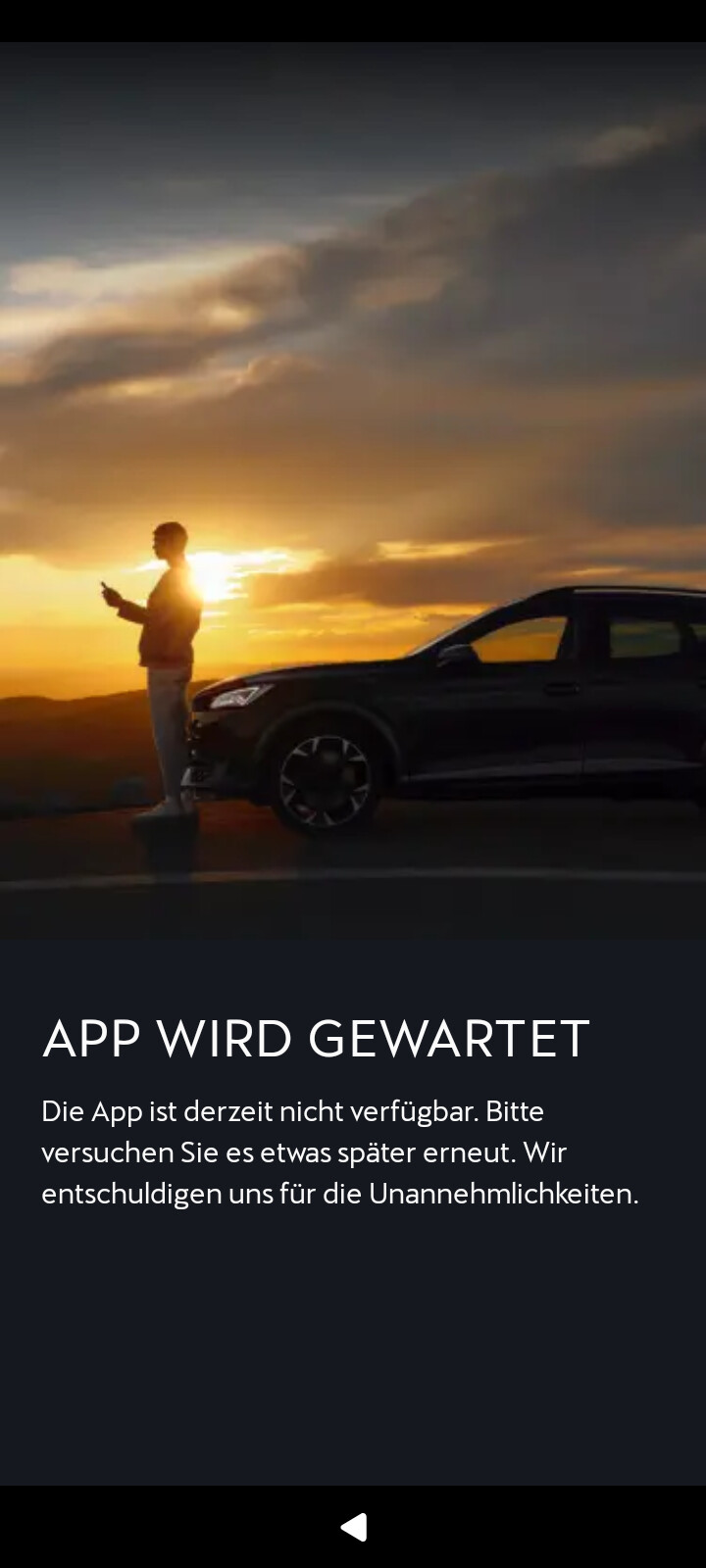
Alt...
Screenshot from MyCupra app:
APP WIRD GEWARTET
Die App ist derzeit nicht verfugbar. Bitte
versuchen Sie es etwas spater erneut. Wir
entschuldigen uns fur die Unannehmlichkeiten.
![[?]](https://files.mastodon.social/accounts/avatars/116/639/977/832/718/561/original/fd15e5da387e7fff.jpg)

![[?]](https://i0.wp.com/www.techdirt.com/wp-content/uploads/2022/02/cropped-techdirt-square-512x512-1.png?fit=192%2C192&ssl=1)
World Cup Propels Surveillance To New Heights
This article is republished from The Conversation under a Creative Commons license. Read the original article. The 2026 FIFA World Cup is the largest sporting event in history. It’s also the most surveilled World Cup ever. If you’re visiting or traveling around host cities, then you and your face, behavior, movement and devices are being monitored by governments and private companies. The […]

Alt...
World Cup Propels Surveillance To New Heights
![[?]](https://files.mastodon.social/accounts/avatars/116/382/948/589/505/833/original/dacbdff0fe89a8aa.jpeg)
Privacy policies are no longer just 'fine print'-they are complex legal maps of your digital identity. With some policies reaching 14,000 words, it is no wonder 56% of users skip them. We examine the regulatory shift toward plain language and the stiff penalties for companies that hide behind jargon.
https://psyll.com/articles/politics/policy-law/decoding-privacy-policies-what-you-agree-to
![[?]](https://files.mastodon.social/accounts/avatars/116/288/047/331/063/768/original/cb19ff2b21b4875d.png)
The Jatter AI browser is officially live, offering a non-agentic approach to web personalization. Built on Chromium, it uses end-to-end encryption and a strict per-site opt-in model so users can get contextual answers without handing over account control. #TechNews #Privacy #Jatter #CyberSecurity #AIBrowsers
https://blazetrends.com/jatter-ai-browser-rejects-autonomous-agents-to-protect-your-private-data/?fsp_sid=48705
![[?]](https://files.mastodon.social/accounts/avatars/111/295/126/578/943/686/original/48997a42ab502432.png)
The EU Parliament just greenlit Chat Control 1.0, enabling mass scanning of private communications.
Running your own chat infrastructure is a practical step to keep conversations private. You can deploy a dedicated Matrix server in a few clicks to maintain complete control over your data.
![[?]](https://cdn.fosstodon.org/accounts/avatars/107/297/362/770/635/523/original/3ce6a735f191afe9.jpeg)
Daily Digest | 10 July 2026
Your daily dose of Privacy, Data Protection, AI & Cybersecurity news.
5 stories you should not miss.
Read more: https://www.nicfab.eu/daily-digest/
![[?]](https://files.mastodon.online/accounts/avatars/108/212/260/774/884/580/original/571618b750810a41.gif)
If privacy is outlawed, only outlaws will have privacy.
- Phil Zimmerman
A field manual how to take back control.
https://exitchatcontrol.org/
YouTube lagging? 200+ ping in your favorite game due to bad ISP routes?
Free VPNs cap your speed at 5 Mbps and sell your data. At https://celestride.pro, we use 10 Gbps nodes and Hysteria 2 (UDP) to squeeze maximum speed out of your connection—even on congested LTE networks.
Enjoy uncensored internet at max speed while staying safe from Chat Control tracking. ⚡
![[?]](https://files.mastodon.social/accounts/avatars/109/999/119/965/425/489/original/0ac00ac2dda1354b.png)
vandalism is wrong!
destruction of property is wrong!
are you listening to me?
no?
well good, because i'm being sarcastic as fuck
"More #Flock cameras cut down in #Houston amid some #privacy concerns"
https://abc13.com/post/more-flock-cameras-cut-down-houston-amid-privacy-concerns/19471780/
![[?]](https://social-cdn.vivaldi.net/system/accounts/avatars/115/201/321/136/190/448/original/f9f95a83ee95b96a.jpeg)
RE: https://mastodon.social/@Tutanota/116753280092380874
Great news: I won the @Tutanota #DigitalSovereignty giveaway!
I *really* like what they’re doing with regard to #OpenSource and #Privacy respecting software, so this is very much appreciated. And it’s always thrilling to actually win something!
Tuta boostedWe're celebrating Digital Sovereignty week 🇪🇺🎉
+ To celebrate #DigitalSovereignty we're giving away Tuta's Legend plan to one lucky person.
To win one year of Legend 🌟 with early access to Drive 🌟 all you need to is tell us how you're becoming digitally sovereign 🔐
Let's spread Digital Sovereignty together 🇪🇺💪
You can also get 50% OFF Tuta now: https://tuta.com/digital-sovereignty
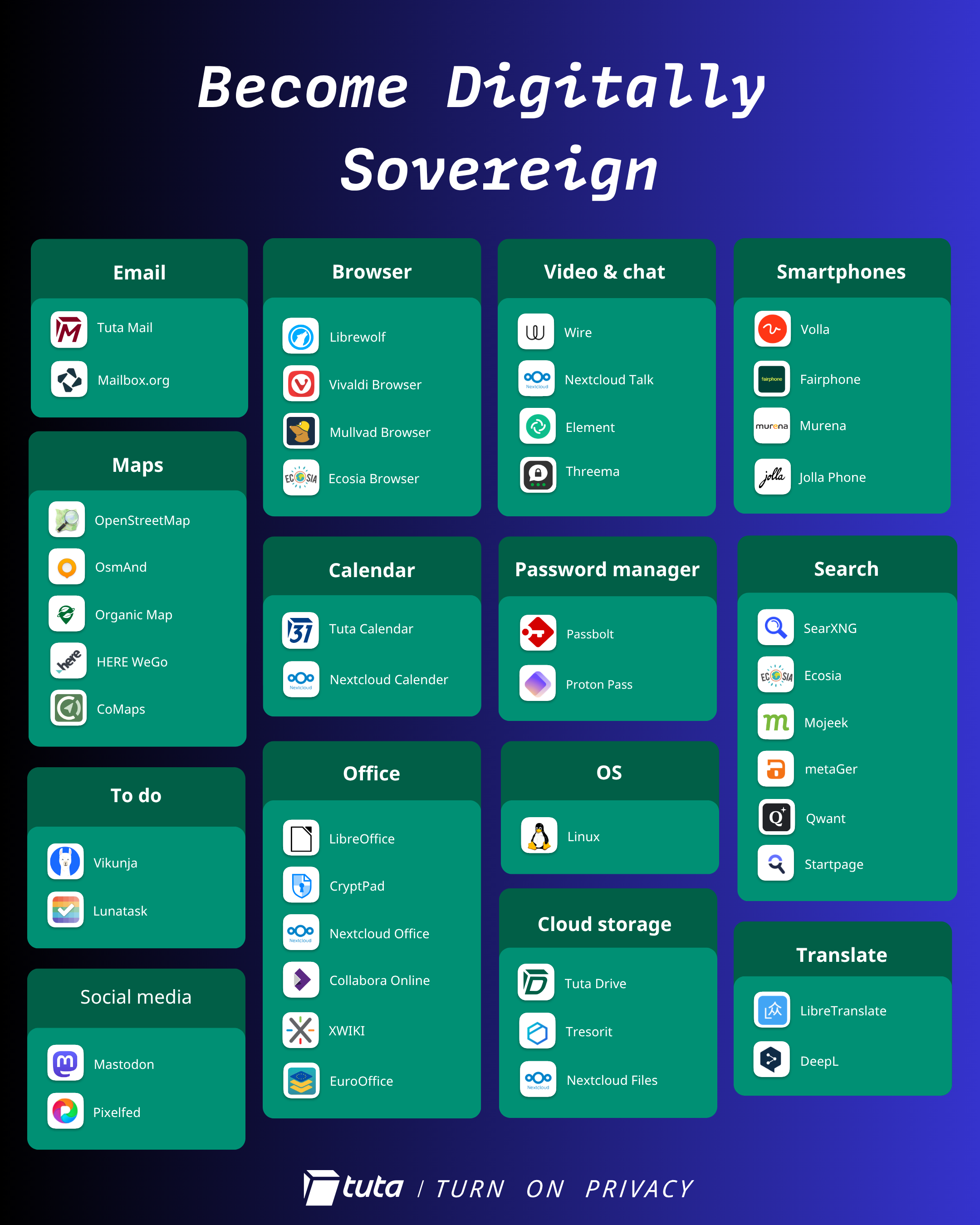
Alt...
Become digitally sovereign with a list of open source and/or European tech alternatives to big tech.
![[?]](https://files.mastodon.social/accounts/avatars/000/207/529/original/0b448846378e746c.png)
![[?]](https://files.mastodon.social/accounts/avatars/000/199/263/original/71d5bf017d9014e3.jpg)
Chat Control 1.0 vs 2.0 - Fight Chat Control
https://fightchatcontrol.eu/chat-control-overview
There is not one proposed “Chat Control” law — there are two, and they are moving through the EU institutions in parallel. This is why the news can seem contradictory: one Chat Control was "stopped" in March 2026, yet another is still being negotiated, and the first is now being revived. This page untangles the two.
![[?]](https://files.mastodon.social/accounts/avatars/108/407/833/047/564/824/original/44e20e7456c1a91d.png)
Tired of Big Tech looking over your shoulder?
Our community proves that there are other options.
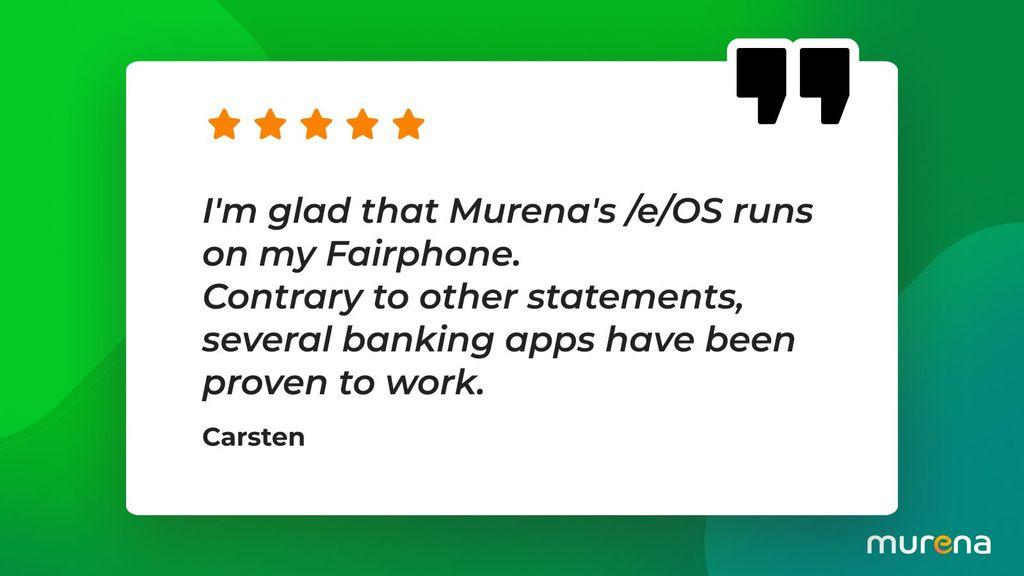
👉 How about Murena? https://murena.com
Alt...
User quote by Carsten, who explains that he's very happy that eOS runs on their Fairphone and that several banking apps work fine
![[?]](https://media.mas.to/accounts/avatars/000/151/244/original/c0322cd63f1b82b3.png)
 🐦🔥nemo™🐦⬛ 🇺🇦🍉
Secure self-hosted team chat platform Chatto is now open source: developer Hendrik Mans released the code under AGPL-3.0-or-later (with Apache 2.0 exceptions). It supports single-community servers and aims to reduce self-hosting complexity. Built-in E2EE voice/video calls arrive in v0.4+. https://cyberinsider.com/secure-self-hosted-team-chat-platform-chatto-goes-open-source/ 🔒🗣️ #OpenSource #Privacy #SelfHosted
"Worried about Flock cameras? All new cars in the EU now need to have a camera aimed at the driver's face in the latest privacy nightmare"
"Every new car sold in the EU must now include a driver-monitoring camera, sparking latest data privacy row"
![[?]](https://public.mitra.social/media/ea33ac46ee9134f46604a8de057321fb61f6e103858bbe85145558c7986bbe9a.jpe)
HowTo: INSTALLING Browsers in Linux
Here we're going to cover the installation steps of Browsers in Linux - specifically, Debian GNU/Linux.
We're covering the procedural steps for this in Debian Testing (Forkey), which is already beginning the gleanings of what will become Debian 14. At the time of writing,the current kernel version is 7.0.13+deb14-amd64.
Daily drivers will likely be along the lines of Vivaldi, Firefox, Lagrange, and Brave Browser, and in no particular order. Any others will be mostly for particular reasons like, testing, curiosity, Etc., but some specialized products like the Tor browser, which focus on privacy are also covered. This list is by no means complete, but there's a bunch of them we cover, so let's jump right in!
I can haz #Cheezburgerz? 🍔 🍟
Well, let's see... First up is the first rate and fully featured Vivaldi, built on top of the open source Chromium, as are so many others in this list.
- Vivaldi
Manual setup of the Vivaldi Linux repos - According to their website, "you no longer need to do this. After downloading a Linux package and installing it our Linux update repositories will be configured automatically for you to receive updates."
That's awfully nice, so visit the download page above and get the .deb package:
~# mkdir -pv /usr/local/packages/vivaldi; cd /usr/local/packages/vivaldi
~# wget https://downloads.vivaldi.com/stable/vivaldi-stable_8.1.4087.48-1_amd64.deb
~# apt install ./vivaldi*.deb
- That's it! You're ready to go now.
Next up...
- Firefox~# apt update && apt install firefox
- Brave Browser
~# apt install curl
~# curl -fsSLo /usr/share/keyrings/brave-browser-archive-keyring.gpg https://brave-browser-apt-release.s3.brave.com/brave-browser-archive-keyring.gpg
~# curl -fsSLo /etc/apt/sources.list.d/brave-browser-release.sources https://brave-browser-apt-release.s3.brave.com/brave-browser.sources
~# apt update && apt install brave-browser
- DuckDuckGo (on Android - There's no Linux port)
- Edge (For the sake of completeness in testing? For the love of God, WHY???)
~# mkdir -pv /usr/local/packages/edge; cd /usr/local/packages/edge # download Edge from the link above into this directory
~# apt install -y ./microsoft-edge-stable_147.0.3912.98-1_amd64.deb # or whatever version you downloaded.
- Lagrange
~$ apt update && apt install flatpak
~$ flatpak install flathub fi.skyjake.Lagrange
- Chromium
~# apt update && apt install chromium
- Opera
~# mkdir -pv /usr/local/packages/opera; cd /usr/local/packages/opera # Download from the link above, for example:
~# wget https://download3.operacdn.com/ftp/pub/opera/desktop/131.0.5877.5/linux/opera-stable_131.0.5877.5_amd64.deb
~# apt install -y ./opera-stable_131.0.5877.5_amd64.deb
Good Ole Lynx, Elinks, and Links. One should not be without at least a couple of these. you can surf HTTP, Gopher, and remain in a character based environment with Lynx, so the utility of testing is available quickly at your fingertips. Also included w3m.
~# apt install -y elinks elinks-data elinks-doc links links2 lynx lynx-common w3m w3m-img
Nyxt: For a more elegant take on the mostly character/CLI based options above you might wish to have this browser in your toolchest. Installing is simple as a FlatPak.
~$ flatpak install flathub engineer.atlas.Nyxt
GNOME Web - aka: Epiphany. Yes, this is the decendent of Galeon, the legacy of which began in 2000. Much of Galeons features were ported to Epiphany, which for whatever reason, is having an existential moment with respect to its name - Officially? It's now GNOME Web, but everywhere it says that, they also include the Epiphany name just so there's no confusion. Huh?
~# apt install epiphany-browser epiphany-browser-data
If you must call it "Web", that's fine, but even if you want to install it as a FlatPak you're going to be invoking Ephiphany, and that's what everyone still calls it anyway:
~$ flatpak install flathub org.gnome.Epiphany
Falkon. Formerly QupZilla, this browser received its new name in 2017 when it was picked up by KDE. With a simple, but modern, themable interface affording the user options resembling that of Firefox, Chrome, Windows, and Mac, it also comes bundled with AdBlock installed and enabled. There are several other features and extensions available including a PDF reader, GreaseMonkey,Tab extensions, Etc., which are available via the KDE store rather than Chrome or Firefox add-on marketplace.
~# apt install falkon
You can also install via Flathub:
~$ flatpak install flathub org.kde.falkon
Konqueror - The longtime File and Web Browser by KDE. It's probably already installed by default if you're running KDE, but if not here you go:
~# apt install konqueror konqueror-data konqueror-doc libkf6konq7 libkf6konqsettings7
And now for something truly special...
~# mkdir -pv /usr/local/packages/chawan; cd /usr/local/packages/chawan
~# wget https://git.sr.ht/~bptato/chawan/refs/download/v0.3.3/chawan-0-3-3-amd64.deb
~# apt update && apt install ./chawan-0-3-3-amd64.deb
Alternatively:
~# mkdir -pv /usr/local/src/chawan; cd /usr/local/src/chawan
/usr/local/src/chawan# wget https://git.sr.ht/~bptato/chawan/refs/download/v0.3.3/chawan-0-3-3-linux-amd64.tar.xz
/usr/local/src/chawan# tar xvf chawan-0-3-3-linux-amd64.tar.xz
/usr/local/src/chawan# cd chawan-0-3-3-linux-amd64/
/usr/local/src/chawan/chawan-0-3-3-linux-amd64# make install
you can start with ~$ mancha cha
DESCRIPTION
Chawan is a text-mode browser. It can be used as a pager, or as a
web/(S)FTP/gopher/gemini/file browser. It understands HTML and CSS, and
when enabled by the user, can also execute JavaScript and display images
(on terminals supporting Sixel or the Kitty image protocol.)
   Chawan can also be used as a general text-based document viewer  as  de‐
   scribed  in  cha-mailcap(5),  or  as a hyperlinked man page viewer using
   mancha(1).
## TorBrowser
This one's a bit more of a chunk to bite into, only because if you're going to endeavor for such security, then you want to make sure to cross all the t's and dot all of the i's.
Import the Tor Browser Developers signing key
(0xEF6E286DDA85EA2A4BA7DE684E2C6E8793298290)
gpg --auto-key-locate nodefault,wkd --locate-keys torbrowser@torproject.org
Your output should look something like:
gpg: key 4E2C6E8793298290: public key "Tor Browser Developers (signing key) <torbrowser@torproject.org>" imported
gpg: Total number processed: 1
gpg:               imported: 1
      EF6E286DDA85EA2A4BA7DE684E2C6E8793298290
uid           [ unknown] Tor Browser Developers (signing key) <torbrowser@torproject.org>
Now that you've imported the key, you can save it to a file, identifying it by the fingerprint above:
~$ mkdir -pv ~/packages/tor; cd ~/packages/tor
~/packages/tor$ gpg --output ./tor.keyring --export 0xEF6E286DDA85EA2A4BA7DE684E2C6E8793298290
From the Tor Project's download page HERE, download the .asc OpenPGP signature file and the TorBrowser package tarball:
~/packages/tor$ wget https://www.torproject.org/dist/torbrowser/15.0.11/tor-browser-linux-x86_64-15.0.11.tar.xz.asc

~/packages/tor$ wget https://www.torproject.org/dist/torbrowser/15.0.11/tor-browser-linux-x86_64-15.0.11.tar.xz
NOTE: At the time of writing, these were the current files downloaded, the filenames will almost certainly have changed by the time you download them, so the tarball and signature file will have different names - adjust accordingly. We'll continue using those filenames below.
Now we verify the veracity of the package's tarball using the .asc signature file like so:
~/packages/tor$ gpgv --keyring ./tor.keyring ~/packages/tor/tor-browser-linux-x86_64-15.0.11.tar.xz.asc ~/packages/tor/tor-browser-linux-x86_64-15.0.11.tar.xz
Your output should confirm a "Good signature":
gpgv: Signature made Tue 28 Apr 2026 02:01:23 AM PDT
gpgv:                using RSA key CAAE408AEBE2288E96FC5D5E157432CF78A65729
gpgv: Good signature from "Tor Browser Developers (signing key) <torbrowser@torproject.org>"
Now we explode the archive:
~/packages/tor$ tar xvf tor-browser-linux-x86_64-15.0.11.tar.xz
Let's give it a go, shall we?
~/packages/tor$ cd tor-browser
~/packages/tor/tor-browser$ ./start-tor-browser.desktop --register-app
Tor Browser has been registered as a desktop app for this user in ~/.local/share/applications/
You'll notice that the permissions of ./start-tor-browser.desktop are set to 700 - It has only been installed for you and you alone. I would recommend that everyone install their own but if that seemed like too much hassle for you to begin with, we can just install it system-wide for everyone, with the following two commands:
~# apt update
~# apt install -y torbrowser-launcher
## Summary, and why
I know I know, I always seem to put the tl;dr's at the very end, but that's only because it humors me :p In this case, however, it really is best if the Tor Browser is installed individually for each and every user account that is going to use it.
Why do I usually put the tl;dr's at the very end of my articles? Because I've observed that the impatient among us are inclined to break something anyway for lack of patience and understanding, and if you really think about it, we've learned a lot today, going over each step and most of the time, why we did it that way.
Even so, when you get to the end there's this nice fluffy and quick way to accomplish your task quickly, and you can do it a hundred times now because you understand the whole thing. On the other hand, the people who just want the tl;dr are typically one of two types of folks - they've got a great handle on things and only need just bare syntax, or.... they're the kind of folks who, when assigned a book to read, start by reading the last couple of pages, then think they're ready for the book report.
For that last group of people, isn't putting the tl;dr at the very end where they really expect to find it anyway?
## Parting Thoughts
Not all of the products that we've covered the installation for today are FOSS. Many aren't even Open Source. We're trying to be complete with all of the various applications in the browser spectrum that people may wish to use - for even the most obscure above, tens of thousands of people use it as their daily driver, or as a particular tool for a job that they perform every day.
I'm going to explain why I decided to include one browser in particular. Years ago...
Microsoft's current version for Windows Internet Exploder was either 3.01b or 3.02b at the time, and this was the only time that I've ever seen this - so I actually have a copy of this browser. In my wanderings across this planet I've seen people complain over the years about there not being any Internet Explorer for Linux, and indeed, this is the case. In fact, in my experience, I've never seen a port of Internet Explorer for any of the Unices (Apple products excepted), until one day when I was installing a Sun Enterprise server running Solaris. I just happened to notice when looking through the files that I saw the rarest of all creatures...
A lone Internet Exploder, version 3.02b (or maybe 3.01b) for Solaris! For Solaris? Why? No, not really why? but given the proof that they could have a port for Linux at anytime and haven't, yet they cozy up to Sun Microsystems and offer a port of Explorer that is supported on Solaris. WoW!
I quickly fell into a state of perplexity. Why Solaris and no one else? Why not Linux? Why not AIX or HP-UX? Why bother at all if they're not going to make it available for Linux and the BSDs too, and I thought long and hard about this.
I still do, and I have a lot of answers. None of which are truly acceptable. Yes, Ballmer called Linux a cancer, now they hug it like a redwood tree. But think of what could have been.
So... Why did I include Microsoft Edge here in this article?
I was being charitable, as I continue looking down my nose at Redmond, dismissively, disparagingly, with just a tinge of a smile containing just a hint of my condescension.
I'll probably continue to add a browser package here and there to this article when I feel it's warranted. There are a lot, and this only covers the most popular and it was good to get these out of the way so perhaps I can tend to the more obscure or peculiar at some other point in time.
I hope that helps!
#tallship #FOSS #browsers #Microsoft_Edge #Firefox #Vivaldi #Brave_Browser #DuckDuckGo #Chromium #Opera #Chawan #Lagrange #Tor #Lynx #Elinks #Links #Nyxt #Epiphany #Falcon #Konqueror #privacy
⛵
Alt...
a motif including about 30 different browsers; some extant, some extinct.
![[?]](https://media.infosec.exchange/infosec.exchange/accounts/avatars/116/751/833/194/065/934/original/99306ec0cfb9064f.png)
One privacy story, every Monday. Legislation, lawsuits, data breaches, and tools that help you respond.
One privacy story, every Monday. Legislation, lawsuits, data breaches, and tools that help you respond.
![[?]](https://acn.social/system/accounts/avatars/116/246/238/447/700/099/original/8adca9c4cd3e3fe3.jpg)
Within EU is now discussed Chat Control. My take on it: private one-on-one chats should remain private, but I would focus on chat groups. Those could be analyzed for security purposes, the discussion being upwards how many members. Should it be 5 or 10 or more? Bigger groups can be used for malicious intent, therefore the measures could make sense. The chat control could be also random, not for every single message or media shared, with ofc the possibility to report. Just so it discourages ill intentions, but still keep conversations private to a certain extent. Maybe a flag, if medias are repeatedly shared over many groups. Where do you draw the line on #privacy of your #message and what is #private , what is #public ? When does one piece of information become public?
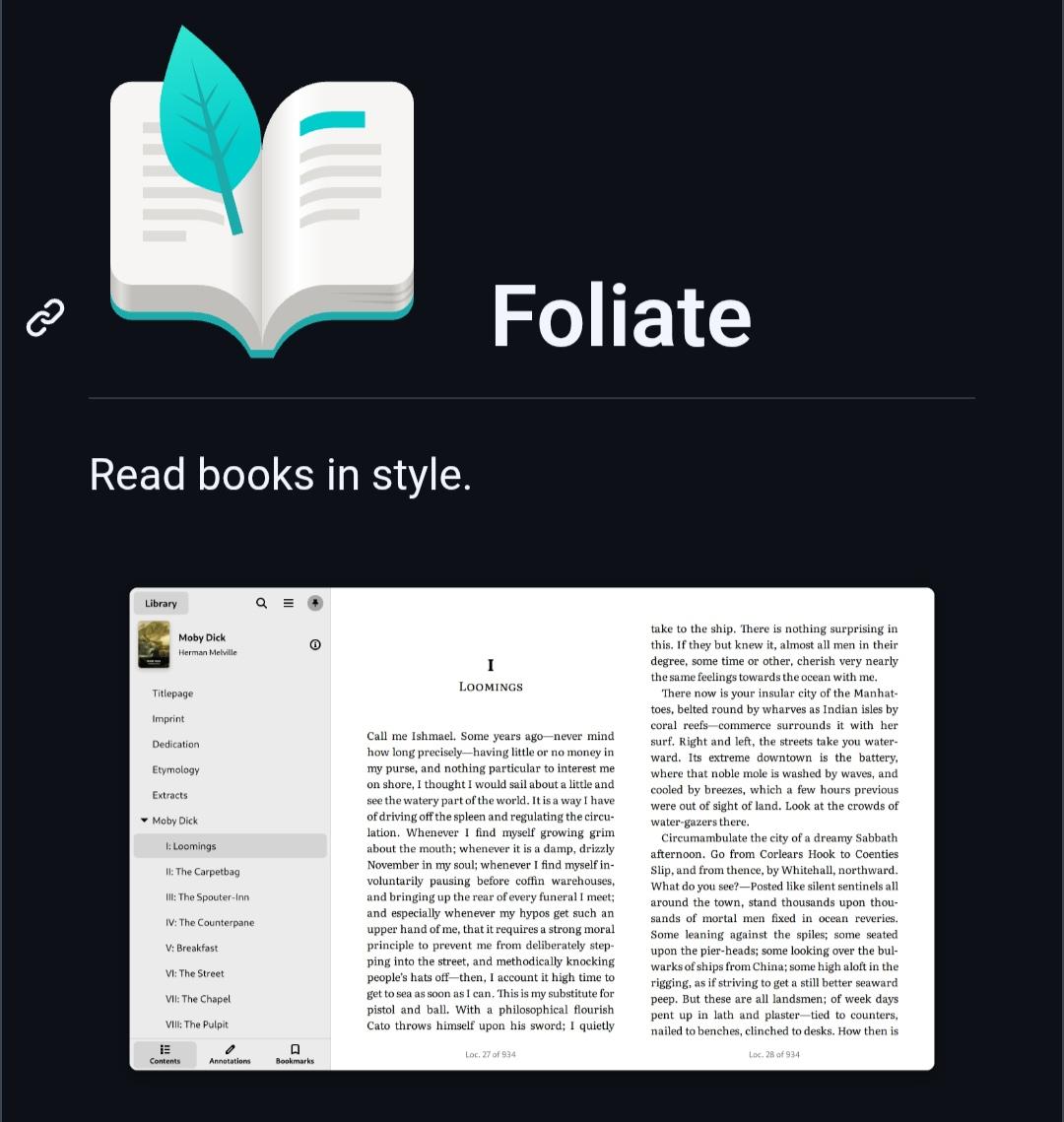
Foliate is a free, open-source eBook reader for Linux with support for EPUB, MOBI, PDF, CBZ, FB2, and more.
It includes dark mode, annotations, dictionary lookup, text-to-speech, bookmarks, and reading progress, all without requiring an account or sending your reading data to the cloud.
More details: https://digitalescapetools.com/tools/tool.html?id=foliate
#OpenSource #Linux #eBooks #Privacy #FOSS #Reading
Alt...
Screenshot of the Foliate project page showing the app logo, the tagline "Read books in style," and a preview of its clean eBook reading interface with a table of contents and an open book.